


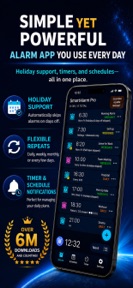
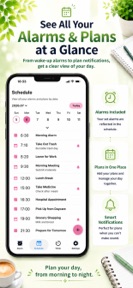



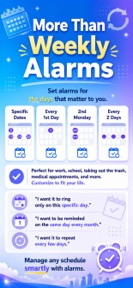


SmartAlarm is a feature-rich alarm clock for iOS and Android that provides holiday-aware scheduling, custom alarm screens, and oversleep-prevention challenges.
The App DNA
What makes this app unique?
Users choose SmartAlarm to replace rigid stock alarm clocks with a tool that handles complex, recurring, and date-specific scheduling without accidental triggers.
For Users requiring highly customizable alarm schedules for work or school who need to prevent oversleeping.
What does it look like?
Key features
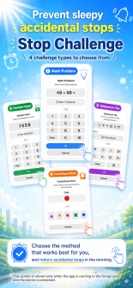
Requires math, tapping, or matching to dismiss alarms.
Automatically skips alarms on holidays to prevent accidental triggers.
Removes ads and increases the 30-alarm limit.
How much does it cost?
The freemium model uses an alarm-count cap and ad-insertion to drive conversion to the Pro tier.
Velocity
Steady developmentUX improvementsnew contentShow more...
The app is currently shipping at a steady cadence, averaging approximately 0.67 releases per week over the observed window. Development is focused on enhancing the core alarm experience through UI redesigns and improved media management features. The latest release also expanded scheduling flexibility with new weekday and holiday exclusion options. This consistent output indicates an active development cycle focused on feature expansion rather than just maintenance.
Who built it?

User Sentiment
What do users think recently?
The recent review mood reads excited. Users appreciate highly customizable alarm settings allow users to tailor wake-up experiences to their specific morning routines and reliable performance over many years builds strong user loyalty across multiple generations of mobile devices, but report post-update alarm failures cause significant frustration for users relying on the app for work.
How are ratings & reviews evolving?
What users say, by theme
- Highly customizable alarm settings allow users to tailor wake-up experiences to their specific morning routines
- Reliable performance over many years builds strong user loyalty across multiple generations of mobile devices
- Simple and intuitive interface design makes managing complex alarm schedules accessible for daily morning use
- Post-update alarm failures cause significant frustration for users relying on the app for work
50 of 50 recent reviews analyzed · high confidence · Excited overall
Read the full review analysisUnlock 2 more frustration themes and 3 user requests, each backed by review evidence.
Access the full report for freeCompetition
Competitive landscape for SmartAlarm - Alarm Clock
How's the Utilities market?
SmartAlarm competes in the crowded Utilities space by offering scheduling depth that stock OS clocks lack. The app maintains a 4.2-star rating on Android, though the lack of iOS review volume suggests the platform expansion is still in the early acquisition phase.
Read the market outlookThe rivals identified
Unlock the deeper market read.
Access the full report for freeThe Analyst's Read
Key takeaways for SmartAlarm - Alarm Clock
Where is it heading?
The alarm clock market is consolidating around high-reliability tools, leaving SmartAlarm exposed if it cannot stabilize its core trigger logic. The latest release shows active development, but the so-what for the PM is clear: feature additions will not offset the revenue compression caused by users abandoning the app due to reliability concerns.
- Recurring alarm-trigger failures following updates erode user trust, which compounds the churn risk for work-focused users.
- The latest release introduced advanced playlist management, demonstrating that the developer remains in active feature-investment mode.
The SWOT
- Granular scheduling logic creates high switching costs for power users
- Stop Challenges maintain daily active habit via forced engagement
- Implement low-light night clock mode to address bedside screen burn-in requests
- Add automatic timezone-aware scheduling for international travelers
Next best moves
Audit alarm-trigger logic because post-update failures are the #1 churn risk → restore reliability baseline
+ 1 more prioritized moveThe counter-intuitive read
The app's reliance on custom stop-challenges is a double-edged sword…
Read the full takeBottom line
SmartAlarm must pivot from feature expansion to absolute stability to prevent the loss of its long-term user base. Addressing the alarm-trigger failures will restore the reliability that currently defines the app's value, preventing churn to system-native alternatives.
Unlock 2 critical frictions, 1 market threat, 1 more prioritized move and the analyst’s take.
Access the full report for freeFAQ
Is SmartAlarm better than the built-in alarm clock?
Does SmartAlarm have intrusive ads?
What is a good alternative to SmartAlarm?
Sources
Report last updated