


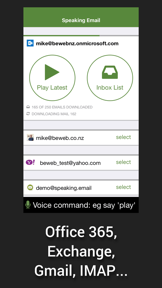
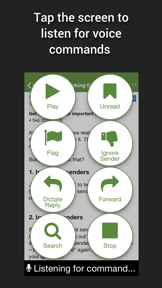
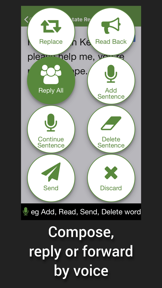
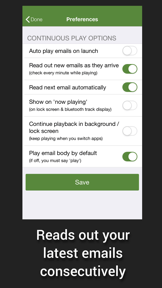
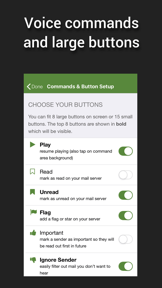
Speaking Email is a voice-operated email reader for iOS and Android that allows users to manage their inbox hands-free via voice commands.
The App DNA
What makes this app unique?
The app removes the need for screen-based interaction during transit, displacing the time-consuming manual process of checking email while driving.
For Commuters, sales professionals, and individuals with visual impairments or dyslexia.
What does it look like?
Key features
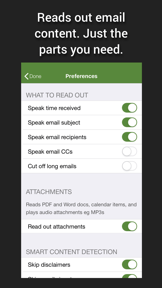
Algorithm skips email signatures and disclaimers to focus on core content.
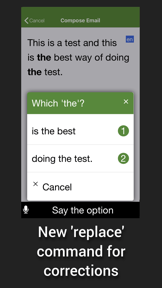
Dictation engine allows hands-free email creation with read-back verification.
Automatically detects and switches voices across 27 languages.
How much does it cost?
The freemium model uses a 7-day trial to demonstrate time-saving value before gating advanced features like multi-account support.
Velocity
Maintenance developmentUX improvementsplatform expansionShow more...
The app has shipped 3 distinct versions within the observed window, resulting in a maintenance-level cadence. Development is currently focused on UX improvements and platform-specific compatibility, as evidenced by the latest release adding continuous voice command support and a previous Android-specific update. The release history shows a significant gap between the Android and iOS update cycles, indicating a lack of unified cross-platform momentum. Overall, the development trend remains stable but infrequent.
Who built it?
BEWEB
5 apps tracked · Productivity
 Care on Call CareNet Payroll
 Florence CareNet Payroll
 Speaking Email CP
 Quest Apartment Hotels NZ
User Sentiment
What do users think recently?
Recent user voice shows a mixed sentiment. Users appreciate voice command features provide essential accessibility and independence for visually impaired users during daily email management and hands-free email access allows commuters and drivers to maintain productivity without violating road safety regulations, but report bluetooth audio integration failures and background playback interruptions prevent reliable use during driving sessions.
How are ratings & reviews evolving?
What users say, by theme
- Voice command features provide essential accessibility and independence for visually impaired users during daily email management
- Hands-free email access allows commuters and drivers to maintain productivity without violating road safety regulations
- Responsive support team actively incorporates user feedback into product improvements over multiple years of development
- Bluetooth audio integration failures and background playback interruptions prevent reliable use during driving sessions
50 of 50 recent reviews analyzed · high confidence · Mixed overall
Read the full review analysisUnlock 2 more frustration themes and 1 user request, each backed by review evidence.
Access the full report for freeCompetition
Competitive landscape for Speaking Email - voice reader
How's the Productivity market?
Speaking Email occupies a niche in the Productivity category, serving users who require hands-free email access. The app maintains a 4.47-star rating across 423 total ratings, but the subscription-only model creates a barrier for users who prefer one-time purchases for utility software.
Read the market outlookThe rivals identified
Unlock the deeper market read.
Access the full report for freeThe Analyst's Read
Key takeaways for Speaking Email - voice reader
Where is it heading?
Users report: The hands-free productivity market is consolidating around platform-integrated solutions, leaving Speaking Email exposed to reliability issues on Android. The app's future depends on closing the platform-parity gap with Android Auto and diversifying monetization to retain utility-focused users.
- Bluetooth connectivity failures during background playback erode the daily active habit, which compounds the rating drag already visible on Android.
- The latest release introduced continuous voice command listening, signaling that the developer is actively iterating on the core hands-free interaction loop.
The SWOT
- Proprietary content-detection algorithm removes audio clutter
- Voice command set provides essential accessibility independence
- Native Android Auto integration would address #1 request
Next best moves
Ship native Android Auto integration because it is the top-requested feature for the commuter segment → increase premium conversion
+ 2 more prioritized movesThe counter-intuitive read
The subscription-only model is not just a monetization choice…
Read the full takeSince the last report: The developer has pivoted their product roadmap to include a lifetime-access purchase tier, directly addressing long-standing user dissatisfaction with the subscription-only model. This shift marks a move toward diversifying monetization to improve retention among utility-focused users.
Bottom line
Addressing the Bluetooth playback instability and adding a lifetime-purchase option would stabilize the core commuter base and reduce churn. These moves would unlock the retention potential currently capped by the subscription-only model and technical friction.
Unlock 2 critical frictions, 1 market threat, 2 more prioritized moves and the analyst’s take.
Access the full report for freeFAQ
Is Speaking Email safe to use while driving?
How does Speaking Email compare to standard screen readers?
Can I buy Speaking Email without a subscription?
Does Speaking Email work with Android Auto?
Sources
- [1] Play Store listing, source
Report last updated