


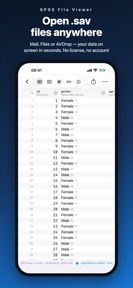


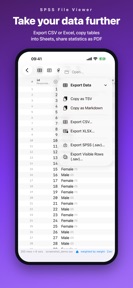
SPSS File Viewer is a productivity tool for researchers to inspect and perform basic statistical analysis on SPSS data files locally on iOS devices.
The App DNA
What makes this app unique?
The app removes the friction of desktop-bound statistical software by enabling immediate, secure data verification without requiring cloud uploads or account registration.
For Researchers, students, and data analysts who need to view or perform basic statistical checks on SPSS files while away from their desktop workstations.
What does it look like?
Key features
Opens .sav, .zsav, and .por files directly on device without cloud upload or account requirements.
Displays full metadata including names, labels, types, formats, measurement levels, and missing definitions.
Calculates frequencies, descriptive statistics, histograms, and weighted statistics directly from the file.
How much does it cost?
The app operates as a free utility to drive awareness and traffic toward the developer's paid TRTT software.
Velocity
Maintenance developmentopaqueShow more...
With only one release in the observed window, the app operates at a maintenance cadence of approximately one release every 1.3 months. Development appears to be in an early stage or limited to initial deployment, as there have been no subsequent updates to address features or performance. The lack of a recurring release schedule suggests a focus on stability rather than active feature expansion.
Who built it?
Rafal Rybnik
2 apps tracked · Productivity
 TRTT: Statistics & .sav Data
User Sentiment
What do users think recently?
How are ratings & reviews evolving?
Not enough recent reviews to extract reliable themes yet.
Read the full review analysisCompetition
Competitive landscape for SPSS File Viewer
How's the Productivity market?
SPSS File Viewer occupies a specialized niche in the Productivity category, serving as a mobile-first viewer for SPSS data. Its value lies in privacy and offline access, distinguishing it from cloud-dependent statistical tools.
Read the market outlookThe rivals identified
Unlock the deeper market read.
Access the full report for freeThe Analyst's Read
Key takeaways for SPSS File Viewer
Where is it heading?
Users report: The market for mobile statistical tools remains fragmented, with most professional workflows tied to desktop environments. SPSS File Viewer is well-positioned to capture researchers who prioritize data security and offline access, provided the developer continues to use the app as a funnel for their advanced TRTT software.
- The maintenance-only release cadence suggests the developer views the app as a stable acquisition funnel rather than a primary product.
- The privacy-first, offline-only architecture creates a defensible niche that cloud-dependent competitors cannot easily replicate without significant infrastructure changes.
The SWOT
- Local-only architecture removes connectivity dependencies
- Full variable dictionary support enables professional-grade data verification
- Lightweight design facilitates rapid file inspection
- Implement in-app prompts for the TRTT suite during export actions
- Add support for additional file formats like Stata or SAS
Next best moves
Integrate TRTT suite prompts during export actions because the viewer serves as an acquisition funnel → increase conversion to paid software
+ 1 more prioritized moveThe counter-intuitive read
The app's maintenance-mode status is a feature, not a bug…
Read the full takeBottom line
SPSS File Viewer maintains a clear utility as a mobile-first entry point for the developer's broader statistical suite. The PM should prioritize funneling users toward the TRTT suite to maximize lifetime value, as the current viewer is a static acquisition tool.
Unlock 3 critical frictions, 2 market threats, 1 more prioritized move and the analyst’s take.
Access the full report for freeFAQ
Is SPSS File Viewer free to use?
Does SPSS File Viewer work offline?
Can I perform advanced statistical analysis like regression in this app?
Sources
- [1] App Store, source
Report last updated