


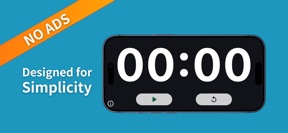


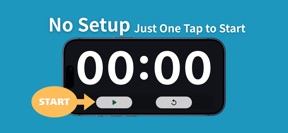
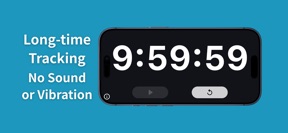
Super Simple Timer - No Ads is a minimalist, ad-free elapsed time tracker for iOS, designed for focused tasks in landscape orientation.
The App DNA
What makes this app unique?
It removes the cognitive friction of setup and the distraction of advertisements for users who only need to track elapsed time visually.
For Users requiring a simple, distraction-free elapsed time tracker for focused tasks like studying, work sessions, or presentations.
What does it look like?
Key features
Count-up timer with high-contrast text on a black background.
Two-button control scheme limited to Start/Pause and Reset.
Fixed orientation layout for low-light visibility.
How much does it cost?
Super Simple Timer - No Ads is distributed as a free utility with no monetization mechanisms identified.
Velocity
Maintenance developmentopaqueShow more...
The app is currently in a maintenance state with only a single release recorded in the analyzed window. Given the 23-day interval since the initial launch, there is insufficient data to establish a recurring development cadence. Future updates will clarify whether this represents a long-term maintenance cycle or the beginning of an active development roadmap.
Who built it?
User Sentiment
What do users think recently?
How are ratings & reviews evolving?
Not enough recent reviews to extract reliable themes yet.
Read the full review analysisCompetition
Competitive landscape for Super Simple Timer - No Ads
How's the Utilities market?
Super Simple Timer - No Ads occupies a niche utility space by stripping away all non-essential features to focus exclusively on visual time measurement. The absence of advertisements distinguishes it from feature-heavy competitors that often gate advanced functionality behind paywalls or ad-supported tiers.
Read the market outlookThe rivals identified
Unlock the deeper market read.
Access the full report for freeThe Analyst's Read
Key takeaways for Super Simple Timer - No Ads
Where is it heading?
The utility market is increasingly dominated by native OS features, leaving standalone timers like Super Simple Timer - No Ads exposed to obsolescence. The app's future depends on its ability to offer a specialized, distraction-free experience that native tools cannot replicate.
- The app is in a maintenance phase with no updates since the initial release, signaling a static feature set.
- The lack of background operation forces users to keep the app open, which limits utility compared to native OS timers.
The SWOT
- Minimalist two-button interface reduces cognitive load during focused work sessions.
- High-contrast landscape display ensures visibility in low-light environments.
- Zero-ad distribution model removes the distraction of interstitial or banner inventory.
- Implementation of optional background-timer support would address the primary accuracy concern for power users.
- Addition of a portrait-mode layout would increase accessibility for users on mobile devices.
Next best moves
Ship background-timer support because accuracy is not guaranteed in sleep mode → increase utility for multi-tasking users.
+ 1 more prioritized moveThe counter-intuitive read
The app's lack of background support is a feature, not a bug…
Read the full takeSince the last report: The product remains in a static maintenance phase with no functional changes, though the documentation of its limitations has expanded to better define its competitive position against native OS tools.
Bottom line
Super Simple Timer - No Ads succeeds as a distraction-free tool, but the lack of background operation prevents it from serving as a primary utility. Adding background support would unlock the app for users who need to switch tasks without losing their time measurement.
Unlock 3 critical frictions, 1 market threat, 1 more prioritized move and the analyst’s take.
Access the full report for freeFAQ
Is Super Simple Timer - No Ads suitable for casual use?
Does Super Simple Timer - No Ads work in the background?
What is the main difference between this and the native phone timer?
Are there any free alternatives to this app?
Sources
- [1] App Store, source
Report last updated