


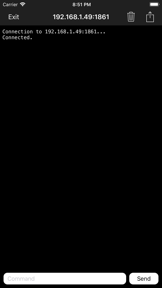


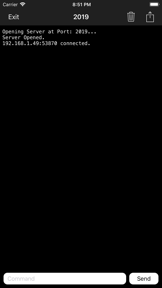


Telnet Terminal is a TCP client/server testing utility for software developers and network engineers on iOS.
The App DNA
What makes this app unique?
The tool removes the friction of needing a desktop workstation to validate network protocol responses during mobile development cycles.
For Software developers and network engineers who need to test TCP client/server communications from a mobile device.
What does it look like?
Key features
Provides a socket-based interface for developers to test TCP connections directly from an iOS device.
Allows selection of specific line endings for protocol testing.
Toggles the removal of control characters from outgoing commands.
Enables relaying client messages and sender metadata to all connected peers in server mode.
How much does it cost?
The app utilizes a flat-fee paid model at $2.99, targeting developers requiring mobile-based network debugging tools.
Velocity
Maintenance developmentplatform expansionShow more...
Telnet Terminal currently operates in a maintenance state, with the latest release occurring 141 days ago. Development activity is limited to infrequent platform compatibility updates, such as the support for iOS 26 included in the latest version. There is no evidence of active feature development or live operations, and the release cadence remains well below the threshold for steady development.
Who built it?
Francesco Nicolas Fabio Vibert
3 apps tracked · Utilities
 France Fuels
 Italy Fuels
User Sentiment
What do users think recently?
How are ratings & reviews evolving?
Not enough recent reviews to extract reliable themes yet.
Read the full review analysisCompetition
Competitive landscape for Telnet Terminal
How's the Utilities market?
Telnet Terminal occupies a narrow niche in the Utilities category, serving technical users via a $2.99 one-time purchase. The absence of recent feature updates and a 141-day gap since the last store update signal a maintenance-only position that relies on existing utility rather than market growth.
Read the market outlookThe rivals identified
Unlock the deeper market read.
Access the full report for freeThe Analyst's Read
Key takeaways for Telnet Terminal
Where is it heading?
The market for mobile network utilities is consolidating around tools that offer secure, encrypted testing capabilities. Telnet Terminal remains stable but exposed, as its lack of secure protocol support will drive professional users toward more modern alternatives that handle encrypted traffic.
- The 20-week release cadence indicates a stable, maintenance-only lifecycle that prioritizes core utility over feature expansion.
- The absence of TLS/SSL support limits the tool to non-secure testing, which restricts its relevance in modern development environments.
The SWOT
- Specialized protocol-testing features like customizable line endings provide a defensible utility for niche network debugging
- Adding support for secure protocols like TLS/SSL would address a significant security gap for professional use
Next best moves
Audit TLS/SSL support requirements because professional network debugging now mandates secure connections → unlock enterprise-grade usage
The counter-intuitive read
The maintenance-only cadence is a feature, not a bug…
Read the full takeSince the last report: The product lifecycle has shifted from a stable utility to a stagnant, maintenance-only state, with documentation now explicitly framing the lack of updates as a risk to long-term compatibility.
Bottom line
Telnet Terminal provides a functional socket-testing utility for mobile engineers, but the lack of recent feature expansion suggests a stagnant product lifecycle that limits its utility against evolving network security standards.
Unlock 1 critical friction, 1 market threat and the analyst’s take.
Access the full report for freeFAQ
Is Telnet Terminal suitable for production network debugging?
How does Telnet Terminal compare to desktop network tools?
Are there free alternatives to Telnet Terminal?
Sources
- [1] App Store, source
Report last updated