


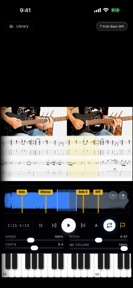


Tempo Loop is a practice utility for musicians on iOS that enables speed and pitch adjustment for audio and video files.
The App DNA
What makes this app unique?
The tool removes the cognitive load of transcribing fast passages by allowing users to slow down content while maintaining original pitch.
For Musicians, music students, and band members who need to practice specific passages or transcribe solos from audio and video files.
What does it look like?
Key features
Adjusts playback speed from 25% to 200% and transposes pitch without altering the other parameter.
Loads video files for full-screen viewing with hidden controls to observe hand movements.
Allows users to define A/B loop points that snap to markers.
How much does it cost?
The freemium model gates advanced audio processing behind a Pro tier while keeping core practice utilities free to maximize user acquisition.
Velocity
Maintenance developmentUX improvementsShow more...
Tempo Loop: Video Slow Downer currently operates on a maintenance cadence, with only one release shipped in the last 28 days. The latest release focused exclusively on rebranding and store listing optimization rather than functional improvements or new features. Development appears stable but limited to minor maintenance tasks. There is no evidence of active feature development or live operations.
Who built it?
User Sentiment
What do users think recently?
Review voice lately leans mixed. Users appreciate variable playback speeds between half and normal tempo help musicians learn complex choreography and musical passages and looping functionality allows users to isolate and repeat specific sections of audio or video files effectively.
How are ratings & reviews evolving?
What users say, by theme
- Variable playback speeds between half and normal tempo help musicians learn complex choreography and musical passages
- Looping functionality allows users to isolate and repeat specific sections of audio or video files effectively
- Lack of file sorting options in the project folder makes managing multiple practice files difficult for users
1 of 1 recent reviews analyzed · limited sample
Read the full review analysisUnlock 1 more frustration theme and 1 user request, each backed by review evidence.
Access the full report for freeCompetition
Competitive landscape for Tempo Loop: Video Slow Downer
How's the Music market?
Tempo Loop occupies a niche in the Music category as a specialized practice tool, currently holding a 3-star rating from a single review. The absence of recent feature updates suggests a maintenance-only posture that limits its ability to compete with more actively developed practice utilities.
Read the market outlookThe rivals identified
Unlock the deeper market read.
Access the full report for freeThe Analyst's Read
Key takeaways for Tempo Loop: Video Slow Downer
Where is it heading?
Tempo Loop is currently in a maintenance phase, with no new feature development in recent patches. The lack of response to user requests for file management and state-saving features creates a churn risk that will likely persist until the developer shifts from maintenance to active feature iteration.
- The maintenance-only release cadence suggests a lack of active feature investment, which risks losing users to more responsive practice tools.
- The current 3-star rating from a single review provides insufficient data to confirm long-term sentiment, requiring a larger sample for validation.
The SWOT
- Native high-quality audio processing enables transcription without pitch distortion
- Implementing persistent loop state would resolve the top-cited workflow friction
Next best moves
Ship persistent loop settings because users report manual reconfiguration as a primary friction point → improve daily practice retention
+ 1 more prioritized moveThe counter-intuitive read
The lack of file organization is not just a usability bug…
Read the full takeSince the last report: Tempo Loop remains in a maintenance-only state with no functional changes. The analysis has shifted to more explicitly link the lack of feature development to specific churn risks.
Bottom line
Tempo Loop provides a capable audio engine, but the current maintenance-only posture fails to address the workflow friction that drives user churn. Prioritizing persistent loop state would unlock the retention potential of the core practice utility.
Unlock 2 critical frictions, 1 market threat, 1 more prioritized move and the analyst’s take.
Access the full report for freeFAQ
Is Tempo Loop free to use?
Does Tempo Loop save my loop settings?
Can I use Tempo Loop to practice with video?
Sources
- [1] App Store, source
Report last updated