


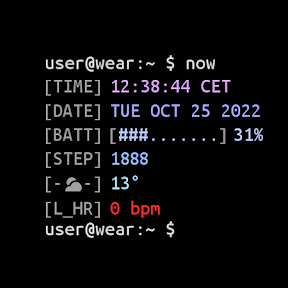


Terminal Watch Face is a Linux-terminal-inspired watch face for Wear OS, designed for developers and technical users.
Product velocity
Dormant
Daily rank 🇺🇸
#190
▲3Personalization · paid
Sentiment
4.2
900 reviews
Nemesis

Nixie Watch V4
The App DNA
What makes this app unique?
The app removes the friction of finding a watch face that matches a technical, programmer-centric aesthetic while maintaining battery efficiency.
For Wear OS users who prefer a technical, Linux-inspired aesthetic and high levels of customization.
What does it look like?
Key features
Allows individual color configuration for lines 3 through 7 on the watch face for devices running API 33 and above.
Uses PNGQuant optimized layers to reduce power consumption on AMOLED displays.
Supports 3 to 5 user-defined complication slots depending on API level.
How much does it cost?
The app is distributed for free, serving as a brand-building tool for the developer's broader portfolio.
Velocity
Dormant developmentUX improvementsShow more...
Terminal Watch face has been inactive for 238 days, placing it firmly in the zombie category. The latest release focused on minor configuration additions and timezone adjustments, but no development activity has been recorded since. There is no evidence of ongoing support or feature expansion for this watch face.
Who built it?
amoledwatchfaces™
13+ apps tracked · Personalization
 Weather Digital Watch Face
 Analog M4 Watch Face
 Outlined Watch Face
 Peak Shadow Watch Face
 Outdoor Watch Face
 Halo Watch Face
 Rush E: Watch face
 Hike ONE Watch face
 Health: Watch Face
 Radial Watch Face
 Dash Analog Watch face
 TACT Q: Watch face
User Sentiment
What do users think recently?
Recent user voice shows an excited sentiment. Users appreciate terminal-inspired aesthetic provides a unique and stylish interface that resonates with linux and coding enthusiasts and battery efficiency is high compared to stock watch faces, allowing for extended use without significant drain, but report installation and setup failures on newer watch models prevent users from accessing the purchased watch face.
How are ratings & reviews evolving?
What users say, by theme
- Terminal-inspired aesthetic provides a unique and stylish interface that resonates with Linux and coding enthusiasts
- Battery efficiency is high compared to stock watch faces, allowing for extended use without significant drain
- Customizable color themes and complication support allow users to tailor the interface to their specific preferences
- Installation and setup failures on newer watch models prevent users from accessing the purchased watch face
50 of 50 recent reviews analyzed · high confidence · Excited overall
Read the full review analysisUnlock 2 more frustration themes and 2 user requests, each backed by review evidence.
Access the full report for freeCompetition
Competitive landscape for Terminal Watch face
How's the Personalization market?
Terminal Watch Face ranks #179 Grossing in the US Personalization category. The lack of recent updates since late 2025 suggests a maintenance-mode posture that risks losing rank to more active rivals.
Read the market outlookThe rivals identified
By MikichBlaz
This app captures the retro-tech aesthetic niche with a massive user base, directly competing for the same programmer-centric audience.
- Features a distinct vacuum tube aesthetic that appeals to a different segment of the retro-tech market
- Maintains a significantly larger user base which creates a stronger social proof barrier for new entrants

Unlock the deeper market read.
Access the full report for freeThe Analyst's Read
Key takeaways for Terminal Watch face
Where is it heading?
The Wear OS personalization market is consolidating around developers who maintain a consistent update cadence. Terminal Watch Face is currently exposed due to its stagnant development, which will likely lead to further ranking declines as newer hardware becomes the standard.
- Installation failures on newer watch models persist, which erodes the user base and prevents new acquisition.
- The lack of feature updates since late 2025 signals a maintenance-only cadence, leaving the app vulnerable to more active rivals.
The SWOT
- Linux-terminal aesthetic provides a unique interface that resonates with coding enthusiasts
- PNGQuant optimized layers ensure battery-friendly performance
- Adding flexible text-prompt customization would address the #1 requested feature from the core developer audience
Next best moves
Audit installation logic for API 34+ devices because setup failures are the primary churn driver → restore install conversion
+ 1 more prioritized moveThe counter-intuitive read
The app's lack of updates is a feature, not a bug…
Read the full takeFeature gaps
Real-time resource analytics (available in NetForge but absent here)
Since the last report: Terminal Watch Face has entered a zombie development state with 238 days of inactivity, resulting in a significant drop in category grossing rank from #41 to #179.
Bottom line
Addressing installation failures on newer hardware is the critical path to stabilizing the user base. If the developer cannot resolve the setup loops, the app will continue to lose ground to competitors with active update cadences.
Unlock 2 critical frictions, 1 market threat, 1 more prioritized move and the analyst’s take.
Access the full report for freeFAQ
Is Terminal Watch Face compatible with the latest Wear OS watches?
How does Terminal Watch Face compare to Nixie Watch V4?
Can I customize the terminal prompt text?
What is a good alternative for technical watch faces?
Sources
- [1] Play Store listing, source
Report last updated