



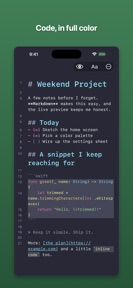

Text Editor is a Markdown-focused writing tool for iOS and iPadOS that stores files locally in the Files app and iCloud Drive.
The App DNA
What makes this app unique?
It removes the friction of account creation and proprietary cloud storage, serving users who prioritize data ownership and offline access.
For Writers, developers, and note-takers who prefer local file management and Markdown-based workflows on iOS and iPadOS.
What does it look like?
Key features
Real-time visual formatting for headings, bold, links, lists, and code blocks during input.
Visual distraction-reduction settings that isolate the current line or paragraph during writing.
Tracks daily goals, writing streaks, and all-time word counts.
How much does it cost?
The freemium model uses a one-time purchase to unlock advanced formatting, writing statistics, and interface modes.
Velocity
Maintenance developmentopaqueShow more...
The app currently operates at a maintenance cadence, with only one release shipped in the last 56 days. Development appears focused on stability or minor adjustments, as the latest release lacks descriptive notes. There is no evidence of active feature development or live operations. The current trajectory suggests a focus on long-term stability rather than frequent updates.
Who built it?
User Sentiment
What do users think recently?
How are ratings & reviews evolving?
Not enough recent reviews to extract reliable themes yet.
Read the full review analysisCompetition
Competitive landscape for Text Editor
How's the Productivity market?
Text Editor occupies a niche in the productivity category by eschewing account-based cloud storage for local file management. The one-time purchase model provides a clear value proposition against subscription-based competitors, though the 57-day gap since the last update signals a maintenance-mode posture.
Read the market outlookThe rivals identified
Unlock the deeper market read.
Access the full report for freeThe Analyst's Read
Key takeaways for Text Editor
Where is it heading?
The productivity market is consolidating around tools that offer either deep cloud integration or specialized developer workflows. Text Editor remains stable due to its local-first value proposition, but it must resume feature development to avoid being sidelined by more agile competitors.
- The 57-day gap since the last update indicates a maintenance-only posture, which limits the ability to respond to market shifts.
- The one-time purchase model provides a clear competitive advantage against subscription-heavy productivity tools, attracting users who prioritize long-term cost efficiency.
The SWOT
- Local file management via iCloud Drive removes the connectivity dependency rivals require
- Git-based workflow integration could capture the developer segment currently using more complex IDEs
Next best moves
Ship Git-based workflow integration because it is a high-value gap for the developer segment → capture power users
+ 1 more prioritized moveThe counter-intuitive read
The lack of proprietary cloud storage is a retention lever for privacy-focused users…
Read the full takeSince the last report: The product roadmap pivoted from a general focus on cross-platform sync to a developer-centric strategy centered on Git-based workflow integration. This shift acknowledges the developer segment as a primary target for future feature investment.
Bottom line
Text Editor's local-first architecture provides a defensible position for privacy-conscious writers, but the current maintenance-only cadence leaves the product vulnerable to more active competitors who iterate on user feedback.
Unlock 1 critical friction, 1 market threat, 1 more prioritized move and the analyst’s take.
Access the full report for freeFAQ
Is Text Editor suitable for developers?
How does Text Editor compare to subscription-based editors?
Does Text Editor require an account to use?
What are some alternatives to Text Editor?
Sources
- [1] App Store, source
Report last updated