


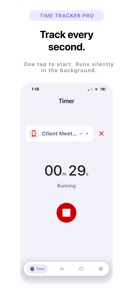


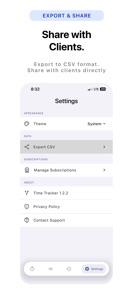

Time Logger Pro is a local-only time tracking tool for freelancers and task managers, available on iOS.
The App DNA
What makes this app unique?
The app removes the friction of account creation and cloud-sync dependencies, serving users who require immediate, private, and offline-accessible logging for billable hours.
For Freelancers and individuals managing multiple tasks who require simple, privacy-focused time tracking without cloud account dependencies.
What does it look like?
Key features
Stores all session data on the device without cloud synchronization, acting as a brand-moat against cloud-based competitors.
Categorizes time logs by specific projects for granular activity reporting; unlimited project creation is a Pro-tier gate.
Allows users to extract time logs for external analysis or billing; gated behind Pro-tier.
How much does it cost?
Freemium model gates historical data and export utility behind a subscription, targeting users who require long-term tracking for professional billing.
Velocity
Maintenance developmentopaqueShow more...
Time Logger Pro maintains a maintenance-level cadence, with only one release shipped in the last 34 days. The development trend is stable but limited to minor technical adjustments rather than feature expansion. As the latest release lacks descriptive notes, the focus remains on internal stability. No significant content updates or live-service events have been identified in the recent history.
Who built it?

User Sentiment
What do users think recently?
How are ratings & reviews evolving?
Not enough recent reviews to extract reliable themes yet.
Read the full review analysisCompetition
Competitive landscape for Time Logger Pro
How's the Productivity market?
Time Logger Pro occupies a niche privacy-first position in the Productivity category, relying on a local-only architecture to differentiate from cloud-dependent rivals. The absence of recent major updates suggests a maintenance-mode posture that limits its ability to compete for power users requiring advanced billing integrations.
Read the market outlookThe rivals identified
Unlock the deeper market read.
Access the full report for freeThe Analyst's Read
Key takeaways for Time Logger Pro
Where is it heading?
The time-tracking category is consolidating around cloud-integrated tools that offer cross-platform billing support. Time Logger Pro remains stable in its privacy-first niche, but the lack of feature expansion will likely lead to a gradual decline in market share as professional users migrate to tools that support complex billing workflows.
- The maintenance-only release cadence indicates a stable but non-growing feature set, which limits the ability to attract new professional users.
- The 7-day history limit in the free tier creates a hard churn risk for freelancers who require monthly billing cycles.
The SWOT
- Local-only storage architecture eliminates account-creation friction
- One-time purchase option targets users rejecting subscription-based productivity tools
Next best moves
Extend free-tier history to 30 days because the current 7-day limit forces churn for billable-hour freelancers → increase retention
The counter-intuitive read
The lack of cloud sync is not a…
Read the full takeSince the last report: The analysis shifted from a neutral observation of the app's maintenance-only status to a critical warning regarding its competitive vulnerability in the professional billing market. The core product remains unchanged, but the assessment of its long-term market position has declined due to the lack of feature expansion.
Bottom line
Time Logger Pro serves a privacy-conscious segment, but the current maintenance-only cadence and restrictive free-tier history limit its professional utility. Extending the free-tier history would address the primary churn driver for billable-hour freelancers, unlocking higher conversion to Pro.
Unlock 1 critical friction, 1 market threat and the analyst’s take.
Access the full report for freeFAQ
Is Time Logger Pro suitable for professional billing?
Does Time Logger Pro require an internet connection?
What is the difference between the free and Pro versions?
Sources
- [1] App Store, source
Report last updated