


Time Tracker - Timelog





Time Tracker - Timelog is a productivity tool for habit and time tracking on iOS and Android.
The App DNA
What makes this app unique?
It removes the cognitive friction of manual habit logging by providing automated background timers and visual insights into time distribution.
For Productivity-focused individuals and students seeking to quantify time usage and build consistent habits.
What does it look like?
Key features
Supports stopwatch, countdown, and Pomodoro timers to accommodate various work styles.
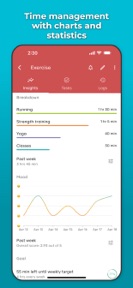
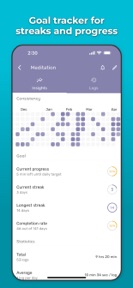
Visualizes time distribution and mood correlations to help users understand their productivity patterns.
How much does it cost?
The freemium model uses a hard activity-count cap to drive conversion to the Plus tier.
Velocity
Maintenance developmentUX improvementsinternationalizationplatform expansionShow more...
The app is currently in a maintenance state, having shipped only one version in the last 101 days. Development activity has been stagnant, with no new feature updates or live operations events recorded since the latest release. Given the current cadence of approximately 0.07 releases per week, the developer is not actively iterating on the product. Future updates remain uncertain as the app has remained silent for over three months.
Who built it?
User Sentiment
What do users think recently?
Review voice lately leans thrilled. Users appreciate minimalist interface design allows students to track study sessions without unnecessary distractions or complex navigation and generous free tier provides access to core tracking features like pomodoro timers and data visualizations, but report inconsistent notification behavior for countdown timers causes users to miss critical study session alerts.
How are ratings & reviews evolving?
What users say, by theme
- Minimalist interface design allows students to track study sessions without unnecessary distractions or complex navigation
- Generous free tier provides access to core tracking features like pomodoro timers and data visualizations
- Persistent background timers allow users to track study progress even when the application is closed
- Inconsistent notification behavior for countdown timers causes users to miss critical study session alerts
59 of 59 recent reviews analyzed · high confidence · Thrilled overall
Read the full review analysisUnlock 2 more frustration themes and 3 user requests, each backed by review evidence.
Access the full report for freeCompetition
Competitive landscape for Time Tracker - Timelog
How's the Productivity market?
Time Tracker - Timelog maintains a high rating of 4.89 across 84 iOS reviews, signaling strong product-market fit among its core user base. The lack of updates over the last three months suggests a shift toward maintenance, which may limit growth against more active competitors.
Read the market outlookThe rivals identified
Unlock the deeper market read.
Access the full report for freeThe Analyst's Read
Key takeaways for Time Tracker - Timelog
Where is it heading?
The productivity market is consolidating around tools that offer both deep analytics and social-gamification loops. Time Tracker - Timelog remains advantaged by its clean interface, but the current maintenance-mode cadence leaves it exposed to competitors who can ship faster, which will erode its lead if notification issues persist.
- Stalled development cadence (no updates in three months) limits the ability to respond to user complaints regarding notification reliability.
- High user satisfaction with the minimalist interface provides a stable foundation for introducing requested features like streak-based gamification.
The SWOT
- Minimalist interface design reduces cognitive load for students tracking study sessions.
- Persistent background timers enable accurate tracking across long sessions without application-switching friction.
- Implement streak-based gamification to reward daily consistency, a top-requested feature.
- Introduce administrative controls for team or student management to capture the professional productivity segment.
Next best moves
Audit notification logic because timer reliability is the #1 user complaint → reduce churn among power users.
+ 2 more prioritized movesThe counter-intuitive read
The lack of updates is not just a…
Read the full takeSince the last report: The app's competitive outlook has shifted from stable to mixed due to persistent notification bugs and a lack of feature iteration. The primary change is a strategic pivot in the product roadmap to prioritize tiered pricing and notification logic audits.
Bottom line
Time Tracker - Timelog holds a strong position with its minimalist design, but the lack of recent feature updates and notification bugs threaten its retention. Addressing these technical hurdles will stabilize the user base while gamification could unlock higher daily engagement.
Unlock 3 critical frictions, 1 market threat, 2 more prioritized moves and the analyst’s take.
Access the full report for freeFAQ
Is Time Tracker - Timelog suitable for casual users?
Does Time Tracker - Timelog have intrusive ads?
What is the main limitation of the free version?
Are there alternatives to Time Tracker - Timelog?
Sources
- [1] App Store reviews
- [2] Play Store listing
Report last updated