


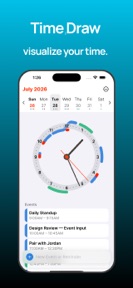
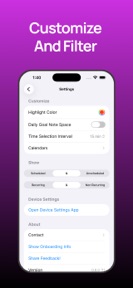

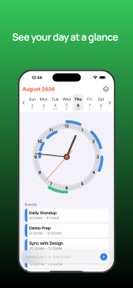

TimeDraw is a productivity utility for iOS that visualizes calendar events and reminders on an analog clockface.
The App DNA
What makes this app unique?
Users prefer spatial, analog-style representations of their daily schedule to spot free time blocks faster than traditional list-based calendars.
For Productivity-focused users who prefer visual, analog-style representations of their daily schedule over traditional list-based calendars.
What does it look like?
Key features
Maps calendar events and reminders onto an analog clock display to show free and busy time blocks, driving daily habit formation.
Separates events occurring before noon inside the clockface and events after noon outside the clockface.
Syncs with system calendars to pull existing events and reminders into the clock interface, reducing friction for new users.
How much does it cost?
TimeDraw is distributed as a free utility with no visible IAP or subscription gates.
Velocity
Maintenance developmentUX improvementsperformanceShow more...
TimeDraw maintains a low-frequency release cadence, shipping approximately one update every 27 days. Development is currently focused on platform-specific refinements, specifically targeting iPad UI improvements and watch-related stability. The project shows no signs of live-ops integration or rapid feature iteration, remaining in a maintenance phase. Future updates are expected to continue addressing technical debt and platform parity rather than introducing major new functionality.
Who built it?
Michael Ellis
3 apps tracked · Productivity
 Rex - Restaurant Discovery
 File Crypt: Secure AES Browser
User Sentiment
What do users think recently?
The recent review mood reads thrilled. Users appreciate high operational efficiency across the core feature set keeps power users engaged during daily sessions.
How are ratings & reviews evolving?
What users say, by theme
- High operational efficiency across the core feature set keeps power users engaged during daily sessions
1 of 1 recent reviews analyzed · limited sample
Read the full review analysisCompetition
Competitive landscape for TimeDraw
How's the Productivity market?
TimeDraw maintains a 4.4-star rating across its limited user base. The absence of monetization gates signals a focus on user acquisition over immediate revenue extraction.
Read the market outlookThe rivals identified
Unlock the deeper market read.
Access the full report for freeThe Analyst's Read
Key takeaways for TimeDraw
Where is it heading?
Productivity tools are shifting toward visual, at-a-glance interfaces to combat list fatigue. TimeDraw is well-positioned to capture this segment if it can transition from a free utility to a sustainable product model.
- The latest release (iPad and watchOS performance) confirms active development, which prevents the app from entering a maintenance-only state.
- The 4.4-star rating indicates high satisfaction among the current user base, though the small sample size limits predictive power.
The SWOT
- Clockface visualization drives daily habit formation by mapping time blocks spatially.
- Noon-split display provides a unique visual rhythm for schedule management.
- Introduce premium features for power users to establish a revenue stream.
- Expand widget support to increase daily active usage.
Next best moves
Introduce a Pro tier for advanced customization because the current free-only model lacks a revenue lever → increase LTV.
The counter-intuitive read
The lack of monetization is not a weakness…
Read the full takeSince the last report: TimeDraw transitioned from a maintenance-only outlook to an active development narrative, while expanding its SWOT analysis to explicitly address the risks of its current free-only model.
Bottom line
TimeDraw offers a unique visual approach to scheduling, but the current lack of monetization limits its ability to scale against established calendar rivals. Introducing a Pro tier would unlock a revenue stream to support ongoing development.
Unlock 2 critical frictions, 2 market threats and the analyst’s take.
Access the full report for freeFAQ
Is TimeDraw suitable for managing complex work schedules?
How does TimeDraw differ from standard calendar apps?
Does TimeDraw include ads or subscription fees?
What are some alternatives for visual calendar management?
Sources
- [1] App Store, source
Report last updated