


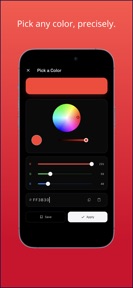
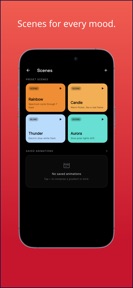
Tint - Color Screen Light is a utility app that turns mobile screens into solid-color light sources for photography, events, and display calibration.
The App DNA
What makes this app unique?
The app removes the need for external hardware lights by providing a controlled, lockable color source that prevents accidental input during use.
For Users requiring a portable light source for photography, live events, or device display testing.
What does it look like?
Key features
Disables touch input on the screen until a 3-second long-press is performed, preventing accidental changes during use.
Preset light patterns including Rainbow, Candle, Thunder, and Aurora to increase time-in-app.
Cycles through 8 solid colors to verify screen reproduction and identify dead pixels.
How much does it cost?
The app utilizes an ad-supported model with no current paid-tier gates, relying on session frequency for revenue.
Velocity
Dormant developmentopaqueShow more...
The app has remained inactive since its initial launch 152 days ago. With only a single version released in the observed window, the development momentum is classified as a zombie state. There have been no subsequent feature updates, bug fixes, or operational events to indicate ongoing support.
Who built it?
kota tada
13+ apps tracked · Utilities
 Photo Trace & Draw - Tracely
 Grow - Height Growth Habits
 Snore Recorder - Snorva
 AuroraVisibility - Pronósti...
 GPS Speed Meter & Trip Log ...
 WorldFill - Mapa de viajes
 US Tide Charts - Marevia
 Bowling Score Tracker - Bow...
 TCG Card Scanner - Cardovia
 Shift Work Planner - Shift
 HairLog - Track Hair Change...
 GratitudeLog - Gratitude Log
User Sentiment
What do users think recently?
How are ratings & reviews evolving?
Not enough recent reviews to extract reliable themes yet.
Read the full review analysisCompetition
Competitive landscape for Tint - Color Screen Light -...
How's the Utilities market?
Tint - Color Screen Light operates as a niche utility in a crowded market. With zero updates since April 2026, it lacks the momentum to challenge category leaders that maintain frequent release cadences.
Read the market outlookThe rivals identified
Unlock the deeper market read.
Access the full report for freeThe Analyst's Read
Key takeaways for Tint - Color Screen Light -...
Where is it heading?
The utility market is consolidating around apps that offer both core light functionality and high-frequency live-ops updates. Tint - Color Screen Light remains stable but exposed; without a return to active development, it will likely lose ground to rivals that integrate more deeply with OS-level shortcuts.
- The five-month development silence indicates a maintenance-mode posture, which limits the app's ability to compete with more active utilities.
- The core lock-mode feature remains a unique differentiator that provides consistent value for the photography and nightlight use cases.
The SWOT
- Lock-mode mechanism prevents accidental input during photography
- Auto-max brightness ensures immediate functional utility
- Home screen widgets would improve one-tap access for event-goers
- Expanded gradient customization could increase engagement for creative users
Next best moves
Ship home screen widget because it is the top-requested utility for immediate access → increase daily session frequency
+ 1 more prioritized moveThe counter-intuitive read
The lack of updates is a feature, not a bug…
Read the full takeBottom line
Tint - Color Screen Light serves a specific utility need through its lock-mode, but the five-month development silence leaves it vulnerable to more active competitors. Investing in immediate-access features like widgets would unlock higher utility for the core photography and event-goer segments.
Unlock 2 critical frictions, 2 market threats, 1 more prioritized move and the analyst’s take.
Access the full report for freeFAQ
Is Tint - Color Screen Light safe for kids to use as a nightlight?
Does Tint - Color Screen Light work without an internet connection?
What is the difference between this and a standard flashlight app?
Sources
Report last updated