


TurboWords Spelling


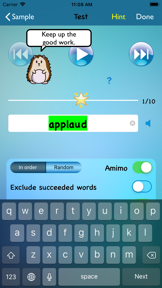


TurboWords Spelling is an education app for iOS that allows students to build and practice custom spelling lists using speech recognition and integrated games.
The App DNA
What makes this app unique?
The app removes the cognitive friction of manual list entry by converting spoken words into study sets, allowing parents to align practice directly with school-assigned curriculum.
For Students and parents seeking a customizable tool for weekly school spelling practice.
What does it look like?
Key features
Records spoken words and converts them into text lists for spelling tests, reducing friction in list creation.
Generates context sentences for words using Apple Intelligence, increasing perceived value.
Allows multiple profiles on a single device via one-time purchase, monetizing household usage.
How much does it cost?
The freemium model uses functional gates for power users, specifically limiting list capacity and multi-user profiles to drive one-time purchases.
Velocity
Maintenance developmentUX improvementsShow more...
TurboWords Spelling maintains a low-frequency release cadence, shipping approximately 0.14 releases per week. The latest release provided only minor adjustments to the information tab, indicating a focus on maintenance rather than active feature development. There is no evidence of live operations or significant content updates in the recent history. Development appears stable but minimal, with no major feature milestones identified in the current window.
Who built it?
Claude Labelle
2 apps tracked · Education
 TurboWords Student Edition
User Sentiment
What do users think recently?
Recent user voice shows an excited sentiment. Users appreciate custom spelling list creation allows parents to tailor study sessions to specific school curriculum requirements and integrated mini-games like word search and crossword puzzles keep students engaged during repetitive study sessions.
How are ratings & reviews evolving?
What users say, by theme
- Custom spelling list creation allows parents to tailor study sessions to specific school curriculum requirements
- Integrated mini-games like word search and crossword puzzles keep students engaged during repetitive study sessions
- Voice input functionality simplifies the process of adding new words to study lists for younger students
- Limited variety of available mini-games leads to boredom during extended study sessions for younger users
49 of 49 recent reviews analyzed · high confidence · Excited overall
Read the full review analysisUnlock 1 more frustration theme and 1 user request, each backed by review evidence.
Access the full report for freeCompetition
Competitive landscape for TurboWords Spelling
How's the Education market?
TurboWords Spelling maintains a 4.57-star rating across 1,779 total ratings, reflecting a stable niche presence in the Education category. The lack of major feature updates in the last six months suggests a focus on maintenance rather than aggressive market share expansion.
Read the market outlookThe rivals identified
Unlock the deeper market read.
Access the full report for freeThe Analyst's Read
Key takeaways for TurboWords Spelling
Where is it heading?
The education app market is consolidating around tools that offer frequent content updates to maintain student engagement. TurboWords Spelling remains stable due to its core utility, but the lack of recent feature expansion leaves it exposed to rivals that prioritize live-ops, which will eventually erode its current rating baseline.
- The lack of major feature updates over the last six months signals a maintenance-mode posture, which risks losing share to more active competitors.
- High user satisfaction with custom list creation and voice input provides a stable retention base that protects the app from immediate churn.
The SWOT
- Speech-to-text list creation reduces friction in the study loop
- AI-generated sentences leverage hardware capabilities to increase perceived value
- Manual text entry would capture users who prefer typing over voice recording
- Expanded game library would increase long-term engagement for daily users
Next best moves
Ship manual text entry for spelling words because it is a top-requested feature for fast typists → increase user retention
The counter-intuitive read
The app's maintenance-mode status is a feature, not a bug…
Read the full takeBottom line
TurboWords Spelling provides high utility for personalized spelling practice, but the lack of content updates risks long-term churn. Adding manual text entry would address the primary friction point for power users, securing the app's position against more active rivals.
Unlock 2 critical frictions, 1 market threat and the analyst’s take.
Access the full report for freeFAQ
Is TurboWords Spelling suitable for daily school practice?
Does TurboWords Spelling offer a free version?
Can I type my spelling words instead of speaking them?
Sources
- [1] App Store
Report last updated