




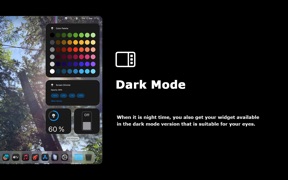




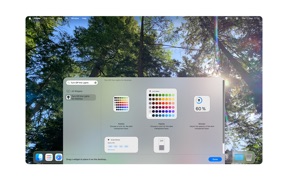
Turn Off the Lights - Desktop is a screen-dimming utility for macOS that provides customizable overlays and focus tools for professional users.
The App DNA
What makes this app unique?
Users hire this app to reduce eye strain and maintain focus during late-night work sessions, solving for visual fatigue that standard system settings do not address.
For Working professionals, journalists, educators, and students who require advanced screen management and focus tools.
What does it look like?
Key features
Keeps the active application window in the foreground while dimming background elements.
Highlights the mouse cursor or a specific rectangular area to emphasize content.
Secures the dimming state using PIN or Touch ID for shared spaces.
How much does it cost?
Premium one-time purchase model anchored at $24.99, positioning the app as a professional utility rather than a subscription-based service.
Velocity
Maintenance developmentShow more...
5 versions in history. Development pace: maintenance.
Who built it?
Stefan Van Damme
13+ apps tracked · Productivity
 Zoom for Safari
 Turn Off the Lights for Safari
 Turn Off the Lights for Mobile
 Full Screen for Safari
 Aerial View Tab for Safari
 Date Today
 Hard Disk - Monitor Disk Usage
 Finance Toolbar - Stock Ticker
 Proper Menubar for Safari
 Print for Safari
 Home Tab for Safari
 Rotate that Video Player
User Sentiment
What do users think recently?
Review voice lately leans thrilled. Users appreciate the app provides a high-quality experience that feels like a native part of the operating system.
How are ratings & reviews evolving?
What users say, by theme
- The app provides a high-quality experience that feels like a native part of the operating system
1 of 1 recent reviews analyzed · limited sample
Read the full review analysisCompetition
Competitive landscape for Turn Off the Lights - Desktop
How's the Productivity market?
The app occupies a premium niche in the Productivity category, relying on a $24.99 price point that targets power users over casual consumers.
Read the market outlookThe rivals identified
Unlock the deeper market read.
Access the full report for freeThe Analyst's Read
Key takeaways for Turn Off the Lights - Desktop
Where is it heading?
The screen-dimming utility market is consolidating around system-native features, leaving premium third-party tools exposed to feature creep from the OS. The app must lean into its professional-grade security and focus features to maintain its value proposition against free alternatives.
- Recent updates focus on platform-specific alignment and technical maintenance, ensuring the tool remains compatible with the latest desktop environment.
The SWOT
- Native-feeling macOS integration provides a high-quality user experience
- Focus Mode utility differentiates the app from basic system-level brightness controls
- Education partnerships could leverage the Spotlight feature for presentation software markets
- Enterprise-friendly security features could drive B2B adoption in shared office environments
Next best moves
Ship a 7-day free trial because the $24.99 price point creates a high conversion barrier → increase install-to-purchase conversion
The counter-intuitive read
The app's high price is not a weakness…
Read the full takeSince the last report: The app has repositioned itself as a professional-grade productivity tool with a fixed $24.99 price point and advanced security and focus features.
Bottom line
Turn Off the Lights - Desktop provides a high-fidelity focus tool for professionals, but the $24.99 price point limits the funnel, so the PM should prioritize a limited-time free trial to reduce the conversion barrier.
Unlock 2 critical frictions, 1 market threat and the analyst’s take.
Access the full report for freeFAQ
Is Turn Off the Lights - Desktop worth the $24.99 price?
Does this app work with macOS Dark Mode?
Can I use this app in a shared office environment?
Sources
- [1] App Store, source
Report last updated