


Vaultwarden Password Manager


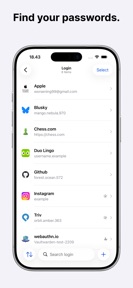


Vaultwarden Password Manager is a native iOS client for self-hosted credential servers, allowing users to manage passwords, passkeys, and secure notes.
The App DNA
What makes this app unique?
The app removes the reliance on third-party cloud providers by enabling users to maintain full control over their credential storage infrastructure.
For Technical users who manage their own Vaultwarden password server and require a native iOS client for credential access.
What does it look like?
Key features
Connects the client to a user-controlled Vaultwarden server for credential management.
Integrates with system-level credential prompts for passwords and passkeys.
Maintains an encrypted local copy of credentials for use without server connectivity.
How much does it cost?
The app is distributed as a free, independent client for existing self-hosted server users with no monetization or advertising.
Velocity
Active developmentUX improvementsplatform expansionShow more...
The app is currently in an active development phase, with two releases shipped over the last 13 days. The latest version focuses on improving the tablet user experience through a side-by-side layout and broadening the utility of the iOS AutoFill integration. This cadence suggests a stable, ongoing effort to refine both interface design and core password management functionality. The development trend is currently stable, with clear feature-driven updates rather than purely maintenance-oriented patches.
Who built it?
Rendi Wijiatmoko
3 apps tracked · Utilities
 SelfCloud Drive
 SelfPhotos - Photos for Immich
User Sentiment
What do users think recently?
The recent review mood reads thrilled. Users appreciate privacy-focused design ensures no data leaves the device to cloud services, building trust with security-conscious users and active development cycle provides consistent feature additions and layout improvements that keep the user experience fresh.
How are ratings & reviews evolving?
What users say, by theme
- Privacy-focused design ensures no data leaves the device to cloud services, building trust with security-conscious users
- Active development cycle provides consistent feature additions and layout improvements that keep the user experience fresh
- Autofill behavior triggers redundant prompts that force users to re-select credentials after the app opens
4 of 4 recent reviews analyzed · limited sample
Read the full review analysisUnlock 2 user requests, each backed by review evidence.
Access the full report for freeCompetition
Competitive landscape for Vaultwarden Password Manager
How's the Utilities market?
Vaultwarden Password Manager occupies a specialized niche in the Utilities category, serving users who prioritize self-hosting over cloud-based alternatives. With a 5-star rating from early reviews, the app is positioned as a privacy-focused, native-first alternative to broader password management tools.
Read the market outlookThe rivals identified
Unlock the deeper market read.
Access the full report for freeThe Analyst's Read
Key takeaways for Vaultwarden Password Manager
Where is it heading?
Users report: The market for self-hosted password management is consolidating around native-first clients that bridge the gap between server control and system-level integration. Vaultwarden Password Manager is well-positioned to capture this segment if it continues to polish the native experience, as the current development pace suggests it will out-iterate less active independent clients.
- The latest release ships iPad layout improvements and expanded AutoFill support, demonstrating a high-velocity development cadence that keeps the user experience fresh.
- Persistent friction in the AutoFill flow requires multiple manual interactions, which risks eroding the daily habit for users who value speed.
The SWOT
- Native iOS integration with system-level AutoFill and Passkeys reduces friction for daily credential management.
- Offline vault access ensures credential availability during server connectivity outages.
- Privacy-preserving range requests for breach checks provide security value without exposing sensitive data.
- Implementing application-level PIN protection would address user requests for an extra security layer beyond system authentication.
Next best moves
Refine AutoFill logic to reduce redundant prompts because user reviews flag this as the top usability hurdle → increase login speed
+ 1 more prioritized moveThe counter-intuitive read
The reliance on self-hosting is not a weakness but a retention lever…
Read the full takeBottom line
Refining the AutoFill flow would address the primary friction point currently limiting the native experience of Vaultwarden Password Manager. Prioritizing this interaction will solidify the app's position as the preferred native client for self-hosted users.
Unlock 2 critical frictions, 1 market threat, 1 more prioritized move and the analyst’s take.
Access the full report for freeFAQ
Is Vaultwarden Password Manager free to use?
How does Vaultwarden Password Manager compare to Bitwarden?
Does Vaultwarden Password Manager work offline?
What is a good alternative for self-hosted password management?
Sources
- [1] App Store
Report last updated