


VersaKey: Custom iOS Keyboard
By Chokhlei


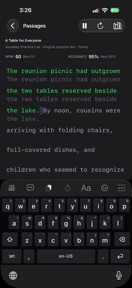


VersaKey is a customizable iOS keyboard for iPhone and iPad that enables flick-based symbol entry and layout remapping.
The App DNA
What makes this app unique?
It removes the cognitive cost of switching keyboard layouts to access numbers and symbols, which is the primary friction point for power users.
For iPhone and iPad users seeking advanced typing customization, faster symbol access, and personalized keyboard behavior.
What does it look like?
Key features
Flick down on keys to enter alternate characters without switching layouts; retention lever by establishing high-frequency habits.
Drills to improve speed and calibrate touch targets; increases switching cost by training the app to individual touch patterns.
Configurable toolbar with up to seven tools; increases user investment in configuration.
How much does it cost?
VersaKey is currently free with no visible subscription or IAP gates, focusing on user acquisition and feature adoption.
Velocity
Maintenance developmentinternationalizationUX improvementsShow more...
With only one release in the observed window and a last update occurring 11 days ago, the app maintains a maintenance-level cadence. Development is currently focused on internationalization and UX improvements, specifically targeting typing responsiveness and layout customization. The project shows a stable but infrequent update pattern, prioritizing feature-rich updates over high-frequency iteration.
Who built it?
User Sentiment
What do users think recently?
Recent user voice shows an excited sentiment. Users appreciate specialized character support for typing non-standard symbols provides utility for users needing specific linguistic accuracy and the keyboard layout offers a high density of useful features on the toolbar compared to competitors.
How are ratings & reviews evolving?
What users say, by theme
- Specialized character support for typing non-standard symbols provides utility for users needing specific linguistic accuracy
- The keyboard layout offers a high density of useful features on the toolbar compared to competitors
- Delayed touch feedback and unresponsive input behavior after opening the keyboard disrupt the typing flow
3 of 3 recent reviews analyzed · limited sample
Read the full review analysisUnlock 1 more frustration theme and 1 user request, each backed by review evidence.
Access the full report for freeCompetition
Competitive landscape for VersaKey: Custom iOS Keyboard
How's the Utilities market?
VersaKey occupies the niche utility space for iOS, currently maintaining a 4.4 rating from early adopters. The lack of monetization gates suggests a focus on building a user base before introducing premium features.
Read the market outlookThe rivals identified
Unlock the deeper market read.
Access the full report for freeThe Analyst's Read
Key takeaways for VersaKey: Custom iOS Keyboard
Where is it heading?
The custom keyboard market is consolidating around utilities that offer granular ergonomic control. VersaKey's current performance regressions leave it exposed, as users will revert to the default iOS keyboard if input latency persists.
- Input latency in the latest version disrupts the typing flow, which directly erodes the daily active habit.
- The latest release added French language support and AZERTY layouts, demonstrating active feature investment rather than maintenance mode.
The SWOT
- Flick-typing mechanism reduces layout-switching friction
- Practice Lab calibrates touch targets to individual user behavior
- Implement haptic feedback to match industry-standard tactile expectations
- Add drag-to-delete gestures to capture power-user workflows
Next best moves
Optimize keyboard launch performance because input latency is the #1 complaint → reduce churn
+ 1 more prioritized moveThe counter-intuitive read
The lack of monetization is VersaKey's biggest risk…
Read the full takeBottom line
VersaKey's flick-typing utility retains power users, but the current input latency creates a high churn risk. Addressing performance must take precedence over feature expansion to ensure the app remains a viable daily tool.
Unlock 2 critical frictions, 1 market threat, 1 more prioritized move and the analyst’s take.
Access the full report for freeFAQ
Is VersaKey safe to use for private typing?
How does VersaKey compare to the default iOS keyboard?
Is VersaKey suitable for casual users?
Sources
- [1] App Store
Report last updated