


Video Converter - GIF Playback
By Atakan DANA


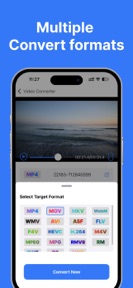

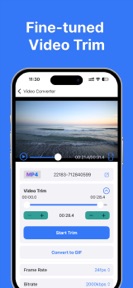

Video Converter is a video utility app for iOS that enables format conversion, trimming, and local file transfers.
The App DNA
What makes this app unique?
The app removes the friction of desktop-to-mobile workflows by providing local Wi-Fi transfer, serving users who avoid cloud-based conversion services.
For Users needing to convert or trim video files for mobile playback or format compatibility.
What does it look like?
Key features
Converts video files between formats including MP4, MKV, AVI, MOV, and GIF.
Imports video files from local network sources to the device library.
Adjusts frame rate and bitrate settings for output files.
How much does it cost?
Monetization relies on auto-renewable subscriptions for advanced conversion features, creating a direct revenue link to power users.
Velocity
Dormant developmentperformanceShow more...
With only one release in the observed window and no updates for 335 days, the app has entered a state of inactivity. Development momentum is non-existent, and the lack of recent patches suggests the project is no longer being actively maintained. The latest release focused solely on minor performance and stability improvements.
Who built it?
Atakan DANA
3 apps tracked · Productivity
 eSign App-Electronic Signature
 Audio Converter : Video to MP3
User Sentiment
What do users think recently?
How are ratings & reviews evolving?
Not enough recent reviews to extract reliable themes yet.
Read the full review analysisCompetition
Competitive landscape for Video Converter - GIF Playback
How's the Productivity market?
Video Converter maintains a niche presence in the Productivity category with a 4.33 rating across 24 total ratings. The lack of updates for 336 days signals a shift toward maintenance-only status, limiting its competitive reach against active rivals.
The rivals identified
The Analyst's Read
Key takeaways for Video Converter - GIF Playback
Where is it heading?
The mobile utility market is consolidating around apps with rapid update cycles that ensure compatibility with new OS versions. Video Converter's current inactivity leaves it exposed to churn, as users prioritize reliability over the existing feature set.
- The 11-month update gap indicates a maintenance-only posture, which erodes user trust and long-term retention potential.
The SWOT
- Wi-Fi file transfer mechanism reduces workflow friction
- Introduce batch conversion to increase utility value
Next best moves
Ship a performance-focused update because the app has been dormant for 11 months → restore user trust
The counter-intuitive read
The app's lack of updates is a greater threat than its feature set…
Read the full takeBottom line
Video Converter's stalled development cycle threatens its long-term viability in the utility market. A performance-focused update is necessary to maintain compatibility and prevent user churn to more active competitors.
Unlock 1 critical friction, 1 market threat and the analyst’s take.
Access the full report for freeFAQ
Is Video Converter free to use?
Does Video Converter support offline conversion?
What is the best alternative to Video Converter?
Sources
- [1] App Store
Report last updated