


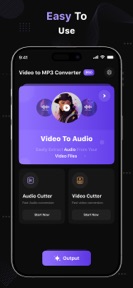


Video to MP3 Converter is an iOS utility that extracts audio from video files using FFmpeg and libmp3lame libraries.
The App DNA
What makes this app unique?
Users need a way to convert video files into local audio tracks for ringtones or offline playback without relying on cloud-based streaming services.
For Mobile users seeking to convert video files to audio for ringtones or local music playback.
What does it look like?
Key features
Extracts audio tracks from video files using FFmpeg and libmp3lame libraries.
Provides manual control over bitrate settings from 48 kb/s to 320 kb/s.
How much does it cost?
Subscription model anchored at $3.50 weekly, gating ad-free usage and advanced conversion settings.
Velocity
Dormant developmentopaqueShow more...
The app has reached a zombie state, with no updates or feature releases in the last 484 days. Development activity has ceased entirely, and the last available release provided only minor metadata updates. There is no evidence of ongoing maintenance or operational support for the platform.
Who built it?
Uchharang Radadiya
4 apps tracked · Entertainment
 File Recovery - Photo Recovery
 EasyCut : Video Editor & Maker
 Image to PDF : PDF Maker
User Sentiment
What do users think recently?
How are ratings & reviews evolving?
Not enough recent reviews to extract reliable themes yet.
Read the full review analysisCompetition
Competitive landscape for Video to MP3 Converter ™
How's the Entertainment market?
Video to MP3 Converter maintains a 4.7-star rating across 18 total ratings, though the lack of updates for 485 days signals a dormant market presence.
Read the market outlookThe rivals identified
Unlock the deeper market read.
Access the full report for freeThe Analyst's Read
Key takeaways for Video to MP3 Converter ™
Where is it heading?
The utility category is consolidating, and Video to MP3 Converter's lack of development over the last 16 months leaves it vulnerable to newer, actively maintained rivals. Resuming a basic maintenance cadence is required to prevent the app from becoming technically obsolete.
- The 485-day gap since the last update indicates a maintenance-only cadence, which will eventually lead to technical failure on newer iOS versions.
The SWOT
- Manual bitrate control (48-320 kb/s) provides a differentiator for users requiring specific audio quality.
- Feature-led re-entry could capture users if the developer resumes updates in this utility niche.
Next best moves
Resume maintenance updates because the 485-day gap risks OS compatibility → prevent rating erosion
The counter-intuitive read
The app's dormant state is its primary risk…
Read the full takeSince the last report: The app remains in a dormant state with no functional updates recorded over the last 16 months. The only material shifts are a minor 0.02-point rating adjustment and a more specific focus on OS compatibility risks in the SWOT analysis.
Bottom line
The app remains in a dormant state, and resuming maintenance updates is necessary to prevent technical obsolescence. Addressing the 485-day update gap would protect the current 4.7-star rating from compatibility-driven churn.
Unlock 1 critical friction, 1 market threat and the analyst’s take.
Access the full report for freeFAQ
Is Video to MP3 Converter free to use?
Does Video to MP3 Converter work offline?
What audio quality settings are available?
Sources
- [1] App Store, source
Report last updated