


vSphere Mobile Client
By VMware
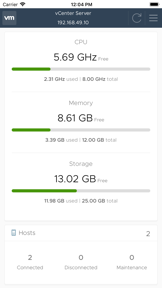
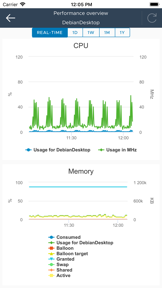
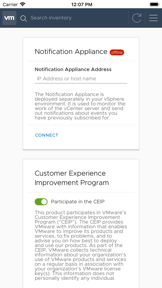
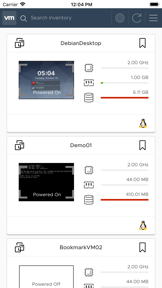
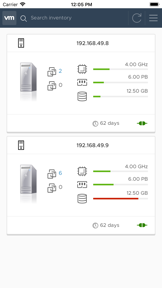
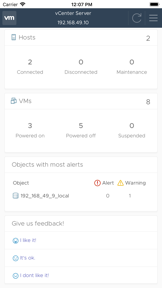

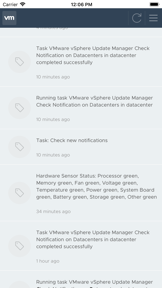
vSphere Mobile Client is a business utility for IT administrators to monitor and manage virtualized infrastructure on iOS devices.
The App DNA
What makes this app unique?
It removes the friction of needing physical desk access to check server status or monitor long-running infrastructure tasks.
For vSphere administrators and IT professionals managing virtualized data center infrastructure on the go.
What does it look like?
Key features
Real-time resource consumption tracking for virtual machines, ESXi hosts, and clusters.
Push alerts for long-running vSphere tasks even when the app is in the background.
Monitoring and basic operations for Kubernetes clusters and namespaces.
How much does it cost?
The app is provided as a free utility for existing vSphere customers, serving as a value-add to the core enterprise infrastructure product.
Velocity
Dormant developmentopaqueShow more...
The app has been inactive for 1673 days, indicating a complete cessation of development. There have been no feature updates or maintenance patches in the provided window. The project appears to be in a zombie state with no signs of ongoing support or engagement.
Who built it?
User Sentiment
What do users think recently?
Recent user voice shows a frustrated sentiment. Users appreciate lightweight design provides a functional interface for monitoring virtual machine statistics and power states and notification integration for server tasks keeps administrators informed about infrastructure status while away from desks.
How are ratings & reviews evolving?
What users say, by theme
- Lightweight design provides a functional interface for monitoring virtual machine statistics and power states
- Notification integration for server tasks keeps administrators informed about infrastructure status while away from desks
- Missing remote console capabilities prevent administrators from performing essential troubleshooting or logging into virtual machines
26 of 26 recent reviews analyzed · moderate confidence · Frustrated overall
Read the full review analysisUnlock 2 more frustration themes and 1 user request, each backed by review evidence.
Access the full report for freeCompetition
Competitive landscape for vSphere Mobile Client
How's the Business market?
vSphere Mobile Client functions as a specialized B2B utility for VMware administrators, maintaining infrastructure visibility rather than competing for general productivity market share.
Read the market outlookThe rivals identified
Unlock the deeper market read.
Access the full report for freeThe Analyst's Read
Key takeaways for vSphere Mobile Client
Where is it heading?
The lack of updates for over four years leaves vSphere Mobile Client in a maintenance-only state that is increasingly incompatible with modern operating systems. The current trajectory suggests continued sentiment decline as users encounter launch failures that the developer has not addressed since 2022.
- Launch-time crashes following the latest update prevent users from accessing their virtual infrastructure, which drives immediate churn and negative sentiment.
- The absence of a functional remote console prevents essential troubleshooting, limiting the app to a passive monitoring role rather than active management.
The SWOT
- Notification integration for server tasks reduces administrator downtime.
- Advanced keyboard support for remote console sessions would allow administrators to send special system commands.
Next best moves
Rebuild launch stability because launch-time crashes render the app inaccessible to users → restore daily active usage.
+ 1 more prioritized moveThe counter-intuitive read
The app's lack of a functional remote console is a deliberate security boundary…
Read the full takeBottom line
Resolving launch-time crashes and adding functional remote console input would restore the app's utility for professional administrators. Prioritizing stability over new feature expansion will prevent further sentiment decline among the existing user base.
Unlock 2 critical frictions, 1 market threat, 1 more prioritized move and the analyst’s take.
Access the full report for freeFAQ
Is vSphere Mobile Client suitable for emergency server troubleshooting?
Does vSphere Mobile Client require a VPN to access my infrastructure?
What are the main limitations of vSphere Mobile Client?
Sources
- [1] App Store
- [2] Developer website, source
Report last updated