


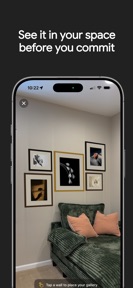
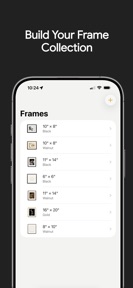
Wally is an augmented reality design tool for iPhone that allows users to plan and visualize photo gallery wall layouts with precise measurements.
The App DNA
What makes this app unique?
The app removes the physical and cognitive cost of trial-and-error drilling by allowing users to test frame arrangements in their own space before installation.
For Homeowners and interior design enthusiasts planning wall art arrangements who want to visualize layouts before installation.
What does it look like?
Key features
Projects virtual frames onto physical walls using camera input to verify scale and placement.
Drag-and-drop interface with snap-to-grid alignment and automatic layout reflow.
Adjustable dimensions, 11 frame colors, 12 matte options, and border width settings.
How much does it cost?
Freemium model uses a one-time purchase to unlock advanced customization and AR features, avoiding recurring subscription costs.
Velocity
Maintenance developmentperformancemonetizationUX improvementsShow more...
The app currently operates on a maintenance cadence, with only one release shipped in the last 96 days. Development is focused exclusively on minor stability and functional adjustments, such as correcting aspect ratios and refining paywall links. There is no evidence of a recurring live-ops strategy or a consistent feature-release pipeline. The current pace suggests a focus on basic upkeep rather than active product expansion.
Who built it?
Funktion Labs
2 apps tracked · Productivity
 Solo: GPS & Ride Tracking
User Sentiment
What do users think recently?
The recent review mood reads thrilled. Users appreciate augmented reality layout tools simplify the process of arranging photos for family photo shoots.
How are ratings & reviews evolving?
What users say, by theme
- Augmented reality layout tools simplify the process of arranging photos for family photo shoots
1 of 1 recent reviews analyzed · limited sample
Read the full review analysisCompetition
Competitive landscape for Wally - Gallery Wall Designer
How's the Productivity market?
Wally operates in the productivity space with a 5.0-star rating from a limited initial user base. The one-time purchase model positions the app as a low-friction utility compared to subscription-heavy design competitors.
Read the market outlookThe rivals identified
Unlock the deeper market read.
Access the full report for freeThe Analyst's Read
Key takeaways for Wally - Gallery Wall Designer
Where is it heading?
The home-design utility market is shifting toward integrated, multi-platform experiences that prioritize user-generated content. Wally remains in a maintenance-only posture, which will likely lead to stagnation as competitors with more frequent release cadences iterate on social-sharing and cloud-sync features.
- The latest update resolved AR aspect ratio errors, which directly improves the core visualization utility for new users.
- The 96-day gap between store updates signals a maintenance-only posture, which leaves the app vulnerable to competitors with faster feature-release cycles.
The SWOT
- Augmented reality projection enables precise scale verification before drilling
- Interactive canvas with snap-to-grid alignment reduces layout planning time
- One-time purchase model lowers the barrier to entry compared to subscription-based design tools
- Localized pricing could capture high-ARPU markets where design apps charge higher premiums
- Adding a template-sharing community could drive organic discovery and user retention
Next best moves
Ship cloud-sync for project files because lack of multi-device access is a primary friction point for home-planning workflows → increase long-term retention
+ 1 more prioritized moveThe counter-intuitive read
The one-time purchase model is a risk, not a strength…
Read the full takeBottom line
Wally provides a clear utility for wall-art planning, but the maintenance-only cadence risks stagnation. Implementing cloud-sync would lock in users by enabling cross-device project management, which is the necessary next step to build a defensible utility.
Unlock 3 critical frictions, 2 market threats, 1 more prioritized move and the analyst’s take.
Access the full report for freeFAQ
Is Wally worth paying for if I only have one wall to design?
Does Wally support cloud syncing for my projects?
What is the main difference between Wally and general design apps?
Sources
- [1] App Store, source
Report last updated