


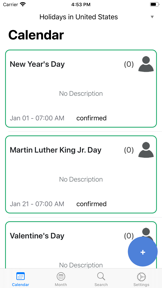
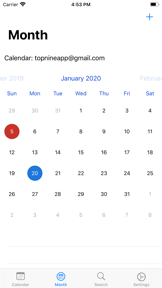
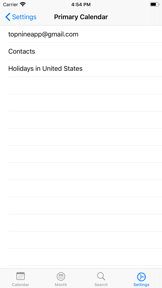

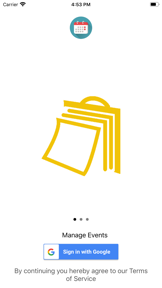

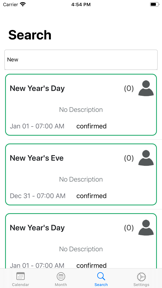
WatchCal is a calendar management app for Apple Watch and iPhone, designed for users who need a dedicated, glanceable interface for Google Calendar.
The App DNA
What makes this app unique?
Users hire WatchCal to offload schedule management from their phone to their wrist, seeking a focused, ad-free experience that avoids the complexity of the full Google suite.
For Apple Watch users who rely on Google Calendar and require a dedicated, watch-optimized interface for event management.
What does it look like?
Key features
Native calendar management and event viewing directly on the watch interface. Revenue link: Primary value proposition for the paid app purchase ($0.99) — direct conversion lever for watch-first users.
Unified access to Google Calendar events and schedules via account authentication. Revenue link: Core utility requirement for app functionality — retention lever for users invested in the Google ecosystem.
How much does it cost?
Paid model at $0.99 entry point, targeting users seeking a dedicated watch-first calendar interface.
Velocity
Dormant developmentopaqueShow more...
The development history shows a complete lack of activity for over 60 months. The most recent release, 'VARY', lacks any associated metadata or release notes, and the previous version dates back to 2020. There is no evidence of ongoing maintenance, feature development, or live operations. The app is classified as a zombie due to the extreme duration of inactivity.
Who built it?
Top Nine
7 apps tracked · Productivity
 Blog for Blogger
 Year-In-Review for Spotify
 TikTags for Hashtags - Likes
 Shuffles by Pinterest
 WristPin for Pinterest
 MiniMail for Yahoo Mail
User Sentiment
What do users think recently?
Recent user voice shows an excited sentiment. Users appreciate cross-platform calendar synchronization allows users to manage appointments across multiple devices and accounts and ad-free experience provides a clean and reliable interface for daily schedule management, but report recent widget design changes reduce readability and remove helpful color-coded event blocks.
How are ratings & reviews evolving?
What users say, by theme
- Cross-platform calendar synchronization allows users to manage appointments across multiple devices and accounts
- Ad-free experience provides a clean and reliable interface for daily schedule management
- Recent widget design changes reduce readability and remove helpful color-coded event blocks
50 of 50 recent reviews analyzed · high confidence · Excited overall
Read the full review analysisUnlock 2 more frustration themes and 2 user requests, each backed by review evidence.
Access the full report for freeCompetition
Competitive landscape for WatchCal for Google Calendar
How's the Productivity market?
WatchCal currently holds #41 Free in US Productivity. The app's focus on watch-first utility creates a distinct segment, yet it remains vulnerable to the free, feature-heavy Google Calendar ecosystem.
Read the market outlookThe rivals identified

By Google
This is the definitive market leader for Google Calendar integration, serving the exact same user intent as WatchCal with massive scale.
- Native ecosystem integration provides seamless cross-device synchronization that third-party apps cannot replicate at the API level.
- Advanced smart scheduling features automatically suggest meeting times based on participant availability and historical patterns.
- Deep integration with Google Workspace allows for instant attachment access and location-based event reminders.


Unlock the head-to-head verdict: where this rival wins, and where it loses.
Access the full report for freeThe Analyst's Read
Key takeaways for WatchCal for Google Calendar
Where is it heading?
The calendar utility market is consolidating around high-frequency, AI-integrated tools, leaving WatchCal exposed due to its maintenance-mode update cadence. Unless the team addresses the widget readability regression, the app will continue to lose its core watch-first audience to the native Google Calendar app.
- The latest widget update (removing color-coded blocks) triggers high-frequency readability complaints, which directly erodes the app's primary value proposition of glanceable scheduling.
- The app maintains a stable, ad-free experience, but the lack of feature expansion leaves it exposed to Google's rapid, AI-driven update cadence.
The SWOT
- Privacy-first data handling builds user trust
- Ad-free interface maintains a clean, professional utility
- Adding countdown widgets for milestones addresses user requests
- Weather integration increases daily app utility
Next best moves
Revert widget design to color-coded blocks because readability is the #1 complaint → restore daily active habit
+ 1 more prioritized moveThe counter-intuitive read
WatchCal's vulnerability is not its $0.
Read the full takeFeature gaps
Smart scheduling suggestions (available in Google Calendar but missing here) +1
Bottom line
WatchCal provides a focused watch-first experience, but the recent widget regression undermines its core utility, so the PM must prioritize restoring visual clarity to prevent churn to the native Google Calendar app.
Unlock 2 critical frictions, 2 market threats, 1 more prioritized move and the analyst’s take.
Access the full report for freeSources
Report last updated