


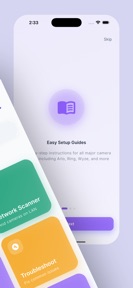


WiFi Camera Setup Toolkit is a diagnostic utility for DIY home security users that provides configuration guides and network scanning for multiple camera brands on iOS.
The App DNA
What makes this app unique?
The app removes the friction of managing multiple manufacturer-specific apps by providing a single, standardized interface for initial camera pairing and network troubleshooting.
For DIY home security users and professional installers requiring diagnostic tools for WiFi camera setup.
What does it look like?
Key features
Detects WiFi cameras on local networks to display IP addresses, ports, and device information
Measures WiFi performance to identify signal dead zones for camera placement
Provides pairing and configuration instructions for multiple camera brands including Arlo, Wyze, and Ring
Captures error codes and connection logs to generate PDF reports for support teams
How much does it cost?
The app is currently offered as a free utility with no visible in-app purchases or subscription tiers.
Velocity
Dormant developmentopaqueShow more...
The app has reached a zombie state, with no updates or feature releases recorded in the last 341 days. Development activity has effectively ceased, as the only available version history consists of a single minor bug fix from late 2025. There is no evidence of ongoing maintenance or operational support for the platform.
Who built it?
The Software Support
5 apps tracked · Utilities
 CommonMail
 MobileSafe: Malware Protection
 Print Master: Air Printer App
 Star VPN: Fast Unlimited Proxy
User Sentiment
What do users think recently?
Review voice lately leans thrilled. Users appreciate simplified setup instructions allow new users to configure their security cameras without technical assistance and broad hardware compatibility enables users to connect multiple camera brands within a single interface.
How are ratings & reviews evolving?
What users say, by theme
- Simplified setup instructions allow new users to configure their security cameras without technical assistance
- Broad hardware compatibility enables users to connect multiple camera brands within a single interface
2 of 2 recent reviews analyzed · limited sample
Read the full review analysisCompetition
Competitive landscape for WiFi Camera Setup Toolkit
How's the Utilities market?
WiFi Camera Setup Toolkit maintains a 4.89 rating across 9 total ratings, reflecting high satisfaction with its cross-brand utility. The lack of updates for 342 days suggests a passive market posture rather than an active attempt to capture category share.
Read the market outlookThe rivals identified
Unlock the deeper market read.
Access the full report for freeThe Analyst's Read
Key takeaways for WiFi Camera Setup Toolkit
Where is it heading?
The smart-home utility market is consolidating around manufacturer-native apps, leaving third-party tools like WiFi Camera Setup Toolkit in a defensive position. Without a return to active development, the app will likely lose its ability to support newer hardware, leading to a decline in user trust.
- The 11-month development gap suggests a maintenance-only posture, which will eventually erode the app's utility as new camera firmware protocols emerge.
The SWOT
- Broad hardware compatibility enables users to connect multiple camera brands within a single interface
- Localized setup guides for emerging smart-home brands
Next best moves
Audit current setup guides against latest firmware protocols because the app has not been updated in 11 months → maintain utility
The counter-intuitive read
The app's lack of updates is a feature…
Read the full takeBottom line
WiFi Camera Setup Toolkit provides value through its cross-brand utility, but the 11-month development gap threatens its long-term relevance as camera firmware evolves. Prioritizing a protocol audit would address the obsolescence risk driving the current maintenance-only posture.
Unlock 1 critical friction, 1 market threat and the analyst’s take.
Access the full report for freeFAQ
Is WiFi Camera Setup Toolkit free to use?
Does WiFi Camera Setup Toolkit work with my Arlo or Ring camera?
Can I use this app to view my camera's live video stream?
Sources
- [1] App Store, source
Report last updated