


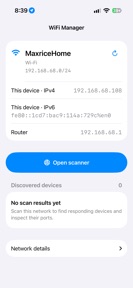

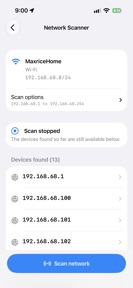

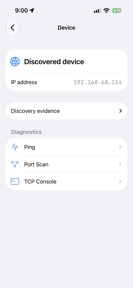
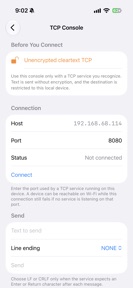
WIFI Manager: Network Scanner is a diagnostic utility for local network inspection and device discovery on iOS.
The App DNA
What makes this app unique?
The app removes the friction of manual command-line network inspection by providing a graphical interface for IP, port, and service discovery.
For Network administrators and power users needing to diagnose local connectivity or inspect open ports.
What does it look like?
Key features
Displays active network interface, local IP, subnet, router address, and public IP information.
Identifies devices on the connected IPv4 network or custom address ranges with hostname and port discovery.
Connects to local services to send text and receive raw responses.
How much does it cost?
The app is currently distributed as a free utility without visible in-app purchases or subscription gates.
Velocity
Maintenance developmentnew contentUX improvementsShow more...
The app has been in a state of prolonged inactivity, with the latest release arriving nearly three years after the previous version. This update represents a major overhaul rather than a routine patch, shifting the app to a rebuilt dashboard with enhanced device inspection and network monitoring capabilities. Given the long gap between releases, the current development momentum is classified as maintenance. Future updates will determine if this rebuild signals a return to active development or remains an isolated event.
Who built it?
Zijie Deng
2 apps tracked · Utilities
 On‑Device AI:Private Workspace
User Sentiment
What do users think recently?
The recent review mood reads frustrated. Users appreciate network scanning functionality helps users identify potentially unauthorized devices connected to their private wireless network.
How are ratings & reviews evolving?
What users say, by theme
- Network scanning functionality helps users identify potentially unauthorized devices connected to their private wireless network
- Randomly playing audio and video advertisements disrupt the user experience and create significant annoyance during navigation
2 of 2 recent reviews analyzed · limited sample
Read the full review analysisCompetition
Competitive landscape for WIFI Manager: Network Scanner
How's the Utilities market?
WIFI Manager: Network Scanner occupies a niche utility space for technical users, currently operating without a paid tier. The reliance on intrusive ads suggests a monetization gap relative to the professional-grade diagnostic features provided.
Read the market outlookThe rivals identified
Unlock the deeper market read.
Access the full report for freeThe Analyst's Read
Key takeaways for WIFI Manager: Network Scanner
Where is it heading?
The network utility market is consolidating around tools that offer clean, professional-grade interfaces. WIFI Manager: Network Scanner remains exposed due to its ad-heavy monetization, which directly undermines the utility of its technical diagnostic features.
- The recent rebuild (v2.0.1) signals a shift from maintenance to active feature development, which may stabilize the user base if followed by UX refinements.
- Persistent complaints regarding intrusive audio ads suggest that the current monetization model conflicts with the needs of the target professional audience.
The SWOT
- TCP console enables manual service interaction for advanced diagnostics
- Subscription tier could remove ad friction for professional users
Next best moves
Sunset intrusive audio/video ads because they disrupt the core diagnostic workflow and drive negative sentiment → improve session retention.
+ 1 more prioritized moveThe counter-intuitive read
The app's ad-heavy monetization is a strategic error…
Read the full takeBottom line
Transitioning to a subscription-based model would allow for the removal of disruptive ads, aligning the product experience with the expectations of network administrators who require reliable, distraction-free diagnostic tools.
Unlock 1 critical friction, 1 market threat, 1 more prioritized move and the analyst’s take.
Access the full report for freeFAQ
Is WIFI Manager: Network Scanner suitable for professional network administration?
Does WIFI Manager: Network Scanner have intrusive advertisements?
What are the primary features of WIFI Manager: Network Scanner?
Sources
- [1] App Store listing, source
Report last updated