


Workcloud My Work


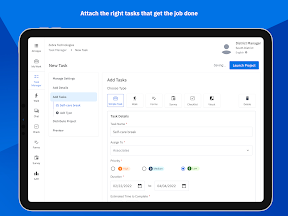


Workcloud My Work is a mobile-first task management app for frontline teams, consolidating nine modules including Pinboard, Walk, and Forms into a single enterprise-licensed interface.
The App DNA
What makes this app unique?
The app removes the need for multiple separate task tools, but the current update forces a web-based authentication flow that disrupts the primary workflow of document access.
For Frontline employees and enterprise teams using Zebra Workcloud Task Management for operational workflows.
What does it look like?
Key features
Integrates nine distinct task management tools into a single interface, reducing app-switching for enterprise users.
Displays only modules licensed under the user's specific enterprise agreement, enforcing licensing tiers.
Automatically saves data when navigating away from Walk and Forms modules, ensuring consistent usage during high-pressure shifts.
How much does it cost?
The app functions as an enterprise-licensed tool for Zebra Workcloud users, with access gated by existing enterprise agreements rather than public store pricing.
Velocity
Intense developmentShow more...
5 versions in history. Development pace: intense.
Who built it?
Reflexis Systems
13+ apps tracked · Productivity
 ESS 41 - Reflexis One
 ESS 45 Zebra
 SM 41 - Reflexis One
 SM 45 Zebra
 ESS 42 - Reflexis One
 Workcloud Docs
 Workcloud Walk
 Zebra Workcloud Comm
 Workcloud Pinboard
 Workcloud Check
 Workcloud Forms
 SM 42 - Reflexis One
User Sentiment
What do users think recently?
The recent review mood reads frustrated.
How are ratings & reviews evolving?
What users say, by theme
- Recent updates break core workflow functionality by forcing users into a web browser for document access
3 of 3 recent reviews analyzed · limited sample
Read the full review analysisUnlock 2 more frustration themes, each backed by review evidence.
Access the full report for freeCompetition
Competitive landscape for Workcloud My Work
How's the Productivity market?
Workcloud My Work currently holds a #189 rank in the UK Business category and #200 in Mexico. The lack of public pricing and reliance on enterprise licensing limits its visibility to existing Zebra Workcloud users.
Read the market outlookThe rivals identified
Unlock the deeper market read.
Access the full report for freeThe Analyst's Read
Key takeaways for Workcloud My Work
Where is it heading?
The market for enterprise task management is shifting toward seamless mobile-first workflows, and Workcloud My Work's recent update moves in the opposite direction by introducing web-based friction. Unless the developer restores native functionality, the app will likely see reduced adoption among frontline teams who prioritize efficiency over consolidated, yet broken, interfaces.
- Navigation regressions and broken document access in the latest update prevent core work tasks, which will accelerate churn among enterprise users.
The SWOT
- Role-based module visibility enforces enterprise licensing tiers.
- Consolidated interface reduces app-switching for frontline teams.
- Native document viewing integration would resolve primary sentiment drivers.
Next best moves
Rebuild native document viewing to bypass web-based authentication because document access is the #1 driver of negative sentiment → restore core utility.
+ 1 more prioritized moveThe counter-intuitive read
The consolidation of nine modules into one interface, while intended to simplify…
Read the full takeSince the last report: The application experienced a sharp decline in utility and sentiment following the latest update, which introduced web-based authentication hurdles that break document access and navigation. These regressions have effectively halted core frontline operations, necessitating an immediate pivot to native document handling.
Bottom line
Restoring native document viewing and fixing navigation paths is critical to regaining user trust, as the current update effectively blocks core work tasks. Addressing these regressions will prevent further churn among enterprise clients who rely on the app for daily operations.
Unlock 2 critical frictions, 1 market threat, 1 more prioritized move and the analyst’s take.
Access the full report for freeFAQ
Is Workcloud My Work free to use?
Why can't I open PDF documents in the app?
What should I do if I cannot navigate to my tasks?
Sources
- [1] Play Store listing
- [2] App Store reviews
Report last updated