


WorkTime: Hours Tracker Log
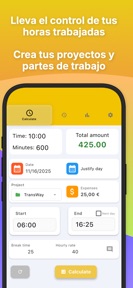
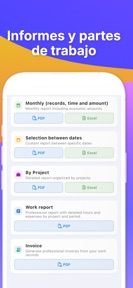


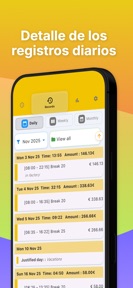

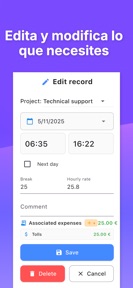

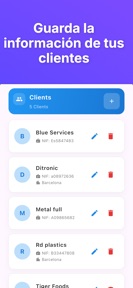

WorkTime: Hours Tracker Log is a productivity tool for freelancers and shift workers to track hours and calculate earnings on iOS and Android.
The App DNA
What makes this app unique?
The app removes the cognitive cost of manual payroll math by automating earnings calculations based on hourly rates and break durations.
For Freelancers, hourly employees, and shift workers requiring simple time tracking and payroll calculation.
What does it look like?
Key features
Apply a single time entry to multiple calendar dates simultaneously.
Compute earnings based on hourly wage and break duration inputs.
Generate professional timesheets for external sharing.
How much does it cost?
The freemium model relies on ad-inventory from the free user base with a single IAP to remove ads.
Velocity
Maintenance developmentUX improvementsperformanceShow more...
WorkTime: Hours Tracker Log maintains a maintenance-level velocity, with three releases identified over the recent window. The latest release demonstrates a focus on user-requested functionality, specifically multi-date selection for time logging. Development appears stable but infrequent, with the most recent update arriving 6 days ago following a two-month gap. The project shows no signs of live-ops or rapid iteration, instead prioritizing occasional feature additions alongside performance maintenance.
Who built it?
Barnasoba, S.L.
6 apps tracked · Productivity
 Fluxi: Budget, Expense Tracker
 Color Wheel RGB CMYK HSL
 Parking Manager: Revenue & Box
 Loan Calculator - PRO
 Calculator hours and minutes
User Sentiment
What do users think recently?
Review voice lately leans excited. Users appreciate the simple and intuitive interface allows users to track work hours and notes without unnecessary complexity and multi-date selection functionality allows users to log repetitive shifts or full weeks in seconds, but report the app requires an active internet connection to function, which blocks usage in offline work environments.
How are ratings & reviews evolving?
What users say, by theme
- The simple and intuitive interface allows users to track work hours and notes without unnecessary complexity
- Multi-date selection functionality allows users to log repetitive shifts or full weeks in seconds
- The low-cost subscription model provides high value for users needing reliable and accurate time documentation
- The app requires an active internet connection to function, which blocks usage in offline work environments
50 of 50 recent reviews analyzed · high confidence · Excited overall
Read the full review analysisUnlock 2 more frustration themes and 1 user request, each backed by review evidence.
Access the full report for freeCompetition
Competitive landscape for WorkTime: Hours Tracker Log
How's the Productivity market?
WorkTime: Hours Tracker Log occupies a niche in the Productivity category, serving users who prioritize simple, automated payroll math over complex project management suites. The 4.8 rating on Android across 5,924 reviews indicates strong product-market fit for the current feature set.
Read the market outlookThe rivals identified
Unlock the deeper market read.
Access the full report for freeThe Analyst's Read
Key takeaways for WorkTime: Hours Tracker Log
Where is it heading?
The category for simple time-tracking tools is consolidating around apps that offer reliable offline performance. WorkTime: Hours Tracker Log remains stable, but the lack of offline capability leaves it exposed to rivals that prioritize field-ready utility.
- The latest release introduced multi-date selection, which has been well-received, signaling active feature investment rather than maintenance mode.
- Recurring complaints regarding offline access and subscription management erode the daily active habit, which compounds the churn pressure already visible in reviews.
The SWOT
- Multi-date entry functionality enables rapid logging of repetitive shifts
- Intuitive interface reduces cognitive load for daily time tracking
- Localized expense categories for fuel could improve precision for mobile workers
Next best moves
Ship offline-first data persistence because connectivity dependency is the top-cited frustration → increase daily active habit
+ 1 more prioritized moveThe counter-intuitive read
The reliance on internet connectivity is a deliberate…
Read the full takeSince the last report: The app transitioned from a passive maintenance outlook to a more active development narrative, while sharpening its focus on churn-inducing friction points like subscription management and offline access.
Bottom line
Automating repetitive shift logging via multi-date entry addresses a core efficiency gap, but the reliance on connectivity for basic tracking creates a barrier that limits utility in field environments. Addressing offline capability would unlock higher retention among this app freelancer base.
Unlock 2 critical frictions, 1 market threat, 1 more prioritized move and the analyst’s take.
Access the full report for freeFAQ
Is WorkTime: Hours Tracker Log suitable for freelancers?
Does WorkTime: Hours Tracker Log work offline?
How do I cancel my subscription in WorkTime: Hours Tracker Log?
Sources
- [1] Play Store listing
Report last updated