


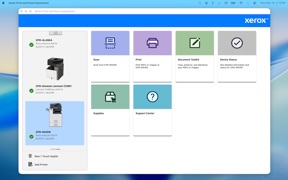

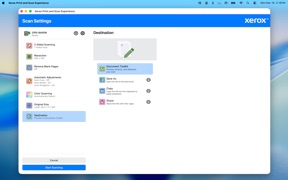
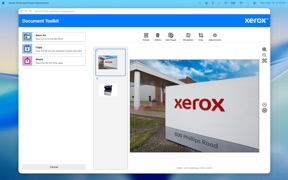

Xerox Print & Scan Experience is a macOS utility for Xerox and Lexmark hardware, offering advanced printing and scanning features.
The App DNA
What makes this app unique?
The app removes the friction of managing complex print jobs and document scans for users already committed to the Xerox hardware ecosystem.
For Professional users and office workers utilizing Xerox or Lexmark hardware on macOS systems.
What does it look like?
Key features
Supports Secure Print, booklet creation, and poster creation for Xerox/Lexmark hardware.
Provides tools to remove, reorder, and add pages, alongside image adjustment features.
Includes pre-scan settings such as auto-crop, auto-straighten, and blank page removal.
How much does it cost?
The app is provided as a free utility to support hardware sales and enterprise retention.
Velocity
Steady developmentShow more...
Who built it?
Xerox
7 apps tracked · Productivity
 Xerox® Workplace
 Xerox® Easy Assist
 Xerox DocuShare
 Xerox DocuShare Flex
 Xerox Event Center
 Xerox Print Service Plugin
User Sentiment
What do users think recently?
How are ratings & reviews evolving?
Not enough recent reviews to extract reliable themes yet.
Read the full review analysisCompetition
Competitive landscape for Xerox Print & Scan Experience
How's the Productivity market?
Xerox Print & Scan Experience functions as a niche hardware utility, lacking the broad install base and review volume of market leaders like PDF Scanner [1, 2].
Read the market outlookThe rivals identified
By DroidVeda LLP
This app competes directly by dominating the mobile document scanning space, capturing the high-volume user base that Xerox targets for its print and scan workflows.
- Offers superior offline processing capabilities, allowing users to scan and enhance documents without active internet connectivity.
- Maintains a massive user review volume, creating a social proof barrier that Xerox's niche utility app lacks.
- Provides highly flexible export options that cater to diverse cloud storage ecosystems beyond the Xerox hardware ecosystem.
 DocScan+: QR & PDF Scanner AppContender
 Herohomepos Warehouse MobileContender
 Kaagaz PDF Scanner & CompressContender
 Juzdan جزدانContender
Unlock the head-to-head verdict: where this rival wins, and where it loses.
Access the full report for freeThe Analyst's Read
Key takeaways for Xerox Print & Scan Experience
Where is it heading?
The market for document utilities is consolidating around cross-platform, OCR-enabled tools that prioritize mobile-first workflows. Xerox Print & Scan Experience remains a stable, hardware-dependent utility, but its failure to modernize document-editing features leaves it exposed to rivals that offer more comprehensive management capabilities.
- The app maintains a steady, maintenance-only cadence, focusing on hardware support rather than aggressive feature expansion.
- The lack of OCR and cloud-agnostic features forces users toward third-party alternatives, which erodes the app's role as a primary document-management tool.
The SWOT
- Specialized print-specific features like booklet creation and secure print provide a defensible barrier for Xerox hardware owners.
- Direct integration with Xerox and Lexmark hardware ensures a consistent enterprise-grade printing experience.
- Implementing native OCR would bridge the feature gap with modern scanning rivals.
- Adding cloud-storage export options would reduce friction for multi-platform document management.
Next best moves
Ship native OCR and text extraction because it is the primary feature gap vs DocScan+ → reduce reliance on third-party tools
+ 1 more prioritized moveThe counter-intuitive read
The app's hardware-tethered design is a retention lever for enterprise clients…
Read the full takeFeature gaps
OCR and text extraction (available in DocScan+ but absent here) +2
Since the last report: The analysis now explicitly identifies the lack of a mobile-first interface and native PDF compression as critical weaknesses, shifting the outlook to reflect increased pressure from third-party document utilities.
Bottom line
Xerox Print & Scan Experience serves as a functional tether for Xerox hardware, but its lack of OCR and cloud-agnostic export limits its utility. Prioritizing document-editing parity would unlock higher retention among office users who currently supplement this app with third-party tools.
Unlock 2 critical frictions, 2 market threats, 1 more prioritized move and the analyst’s take.
Access the full report for freeFAQ
Is Xerox Print & Scan Experience compatible with non-Xerox printers?
How does Xerox Print & Scan Experience compare to PDF Scanner?
Does the app support OCR for converting scans to text?
What are some alternatives for document scanning and editing?
Sources
- [1] App Store, source
Report last updated