


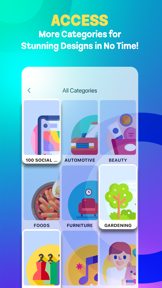

Canvas is a template-based design utility for social media and digital content creation on iOS.
The App DNA
What makes this app unique?
Users hire Canvas to bypass complex design software for quick, aesthetic social media assets, prioritizing speed over creative control.
For Non-designers and social media users seeking quick, aesthetic templates.
What does it look like?
Key features
Over 100 templates for social media, automotive, and beauty categories.
Allows users to request specific template categories.
How much does it cost?
The current free-only model limits long-term revenue potential and R&D capacity.
Velocity
Steady developmentShow more...
Who built it?
Noor Siah
7 apps tracked · Graphics & Design
 GoodReads Prophet Story
 Binoculars Zoom Camera HD 100x
 How to make bookmarks
 Real Kendang
 Reduce Photo Size
 Kitab Qurratul Uyun Indonesia
User Sentiment
What do users think recently?
Fresh user feedback skews mixed. Users appreciate ease of use for quick social media content creation, but report limited template variety and lack of advanced editing controls.
How are ratings & reviews evolving?
What users say, by theme
- Ease of use for quick social media content creation
- Limited template variety and lack of advanced editing controls
Competition
Competitive landscape for Canvas: Template Design Maker
How's the Graphics & Design market?
Canvas currently faces high volatility in international markets, with significant rank drops across multiple regions. The lack of a premium tier prevents the app from competing with professional-grade tools that offer higher-value, AI-driven editing features.
Read the market outlookThe rivals identified

By Farida Yarullina
This app competes for the same creative design audience by offering specialized, high-engagement visual tools that capture users looking for more than just basic templates.
- Offers a dedicated pixel art community network that fosters long-term user retention and engagement.
- Provides advanced frame-by-frame animation tools that significantly exceed the capabilities of standard template-based design apps.
- Integrates directly with Google Drive for seamless asset management across multiple devices and creative workflows.
 Templates for Pages - DesiGNContender
 Flowchart Designer 3Contender
 Flowchart CreatorContender
 Pixelmator Pro: Edit ImagesContender
Unlock the head-to-head verdict: where this rival wins, and where it loses.
Access the full report for freeThe Analyst's Read
Key takeaways for Canvas: Template Design Maker
Where is it heading?
The casual design market is consolidating around tools that offer both speed and professional-grade AI capabilities. Canvas remains in maintenance-mode, leaving it exposed to rivals that provide a clear upgrade path for users, so the app will likely continue to lose chart position without a shift toward a premium, feature-rich model.
- Significant rank drops across multiple international markets suggest the current template library is failing to maintain user interest.
- User frustration with static template constraints indicates a high churn risk as users seek more creative control elsewhere.
The SWOT
- One-click application reduces barrier to entry
- Introduce tiered subscription for advanced editing
- Expand library to include professional document formats
Next best moves
Introduce a premium subscription tier because the current free-only model limits R&D → increase revenue to fund feature expansion.
+ 1 more prioritized moveThe counter-intuitive read
The app's lack of advanced features is not…
Read the full takeFeature gaps
Layer-based editing (available in Pixelmator Pro but missing here) +1
Since the last report: The app's competitive outlook has declined due to international rank volatility and persistent user frustration with static templates, forcing a shift toward premium monetization and core editor development.
Bottom line
Canvas captures casual users through low-friction design, but its static model and lack of monetization leave it vulnerable to professional-grade rivals, so the PM must pivot to a premium tier to fund the editing features that prevent churn.
Unlock 2 critical frictions, 2 market threats, 1 more prioritized move and the analyst’s take.
Access the full report for freeFAQ
Is Canvas: Template Design Maker free to use?
Can I edit the templates in Canvas?
How does Canvas compare to professional design apps?
Sources
- [1] App Store, source
Report last updated