


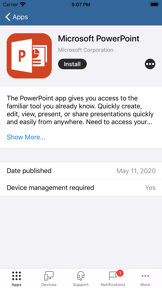

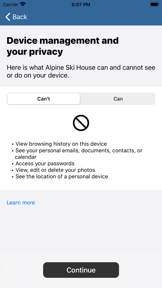
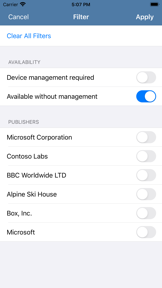

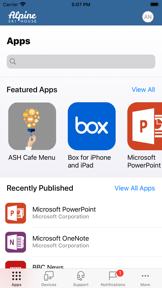

Intune Company Portal is a business application for employees to enroll devices and access corporate resources within Microsoft Intune-managed environments.
The App DNA
What makes this app unique?
Users hire this app to satisfy mandatory security compliance for work access, but the current stability issues force them to spend excessive time on re-authentication.
For Corporate employees requiring secure access to company apps, email, and data on managed mobile devices.
What does it look like?
Key features
Registers mobile devices into corporate management systems
Allows users to remotely erase corporate data
Provides a curated list of approved business applications
How much does it cost?
Monetization is tied to the underlying B2B Microsoft Intune subscription.
Velocity
Active developmentperformanceopaqueShow more...
The app maintains a consistent release cadence of approximately 0.38 releases per week across iOS and Android platforms. Development activity is stable, focusing exclusively on stability and performance improvements. Because all recent release notes are generic and opaque, it is highly probable that the publisher is utilizing server-side feature toggles or A/B testing to manage new functionality rather than documenting changes in the App Store. The development trend is stable, prioritizing infrastructure maintenance over feature-heavy updates.
Who built it?
Microsoft
13+ apps tracked · Business
 Microsoft SharePoint
 Microsoft Defender: Security
 Microsoft Bing Search
 Microsoft Edge
 Microsoft OneDrive
 Xbox
Xbox Link to Windows
 Microsoft OneNote
 Microsoft Word
 Remote Help
 Microsoft Edge Dev
 Microsoft Events
User Sentiment
What do users think recently?
Review voice lately leans mixed. Users appreciate core utility as an official enterprise tool provides reliable access to company email and teams, but report persistent installation and re-authentication loops force users to reset the app multiple times weekly.
How are ratings & reviews evolving?
What users say, by theme
- Core utility as an official enterprise tool provides reliable access to company email and teams
- Persistent installation and re-authentication loops force users to reset the app multiple times weekly
100 of 180 recent reviews analyzed · high confidence · Mixed overall
Read the full review analysisUnlock 1 user request, each backed by review evidence.
Access the full report for freeCompetition
Competitive landscape for Intune Company Portal
How's the Business market?
The app holds a #82 Free rank in the Business category. The significant rating gap between iOS and Android platforms indicates that the latest update stability issues are disproportionately impacting the Android user base.
Read the market outlookThe rivals identified

By Citrix Systems, Inc.
Both apps target enterprise employees requiring secure remote access to corporate resources, competing directly for the primary mobile gateway role in managed environments.
- Citrix Workspace includes native in-app issue reporting, while Intune Company Portal lacks self-service troubleshooting tools.
- Citrix Workspace supports multi-account management, whereas Intune Company Portal focuses on single-tenant Microsoft 365 policy enforcement.
 BlackBerry UEM ClientContender
 ManageEngine MDMContender
 Verizon mdmContender
 Office PortalContender
 MDM ManageContender
 IT Desktop Management 2Contender
 Intelligent HubContender
 Ivanti Mobile@Work™ ClientContender
Show 1 more

Unlock the head-to-head verdict: where this rival wins, and where it loses.
Access the full report for freeThe Analyst's Read
Key takeaways for Intune Company Portal
Where is it heading?
The enterprise mobility market is shifting toward unified cross-platform management, leaving Intune exposed if it cannot match the self-service capabilities of rivals like Intelligent Hub. The current stability issues must be addressed to prevent IT administrators from evaluating alternative identity-focused solutions.
- Persistent re-authentication loops in the latest version erode user trust, leading to increased support ticket volume for IT departments.
- Performance regressions post-update cause infinite loading screens, which compounds the rating drag already visible on the Android platform.
The SWOT
- Native Microsoft 365 policy enforcement
- Mandatory adoption gate for enterprise Intune subscribers
- Expansion of self-service troubleshooting tools to reduce IT help desk volume
Next best moves
Ship self-service troubleshooting diagnostics because re-enrollment loops are the #1 churn risk → reduce IT help desk volume
+ 1 more prioritized moveThe counter-intuitive read
The app's mandatory nature is its greatest weakness: because users cannot switch…
Read the full takeFeature gaps
Unified cross-platform catalog (available in Intelligent Hub but missing here) +1
Since the last report: The app's competitive position is under pressure due to persistent technical instability, resulting in a significant rating drop and a shift in executive focus toward resolving core utility failures.
Bottom line
The app maintains its category lead through Microsoft 365 integration but bleeds user trust through persistent authentication failures, so revenue stability hinges on prioritizing self-service troubleshooting over new feature development.
Unlock 3 critical frictions, 2 market threats, 1 more prioritized move and the analyst’s take.
Access the full report for freeReport last updated