




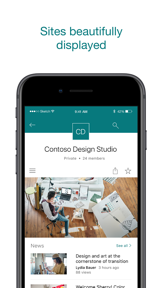
Microsoft SharePoint is an enterprise productivity app for accessing and managing internal company files, sites, and news on iOS and Android.
The App DNA
What makes this app unique?
Users hire SharePoint to maintain secure, authenticated access to corporate document repositories while mobile, ensuring they remain connected to organizational workflows.
For Enterprise employees and information workers who need to access, share, and collaborate on internal company content while mobile.
What does it look like?
Key features
Analyzes user work patterns and colleague relationships to surface relevant sites, files, and news
Supports simultaneous sign-in and switching between multiple SharePoint accounts
Allows creation and sharing of news posts, reports, and status updates directly from mobile
Supports cloud and on-premises SharePoint Server 2013 and higher via NTLM and Forms Based Authentication
Centralized search bar for locating files, sites, and people across the organization
How much does it cost?
The app functions as a zero-cost access point for existing enterprise Microsoft 365 subscribers, with monetization tied to the broader B2B software license.
Velocity
Maintenance developmentperformanceopaqueShow more...
The app ships approximately 0.19 releases per week, placing it firmly in the maintenance tier. Development is characterized by a consistent focus on stability and bug fixes, with no evidence of new features or live operations in the provided release history. The publisher utilizes opaque release notes across all recent updates, suggesting that changes are limited to minor technical adjustments rather than significant feature rollouts. The cadence has remained stable over the last three months.
Who built it?
Microsoft
13+ apps tracked · Productivity
 Microsoft Defender: Security
 Microsoft Bing Search
 Microsoft Edge
 Microsoft OneDrive
 Xbox
Xbox Link to Windows
 Microsoft OneNote
 Microsoft Word
 Remote Help
 Microsoft Edge Dev
 Microsoft Events
 Work Folders
User Sentiment
What do users think recently?
Recent user voice shows a mixed sentiment. Users appreciate core collaboration features enable efficient team file sharing and document access for daily operations and intuitive navigation within the interface allows users to locate necessary work documents quickly, but report persistent authentication loops force repeated sign-ins that disrupt workflow and prevent task completion.
How are ratings & reviews evolving?
What users say, by theme
- Core collaboration features enable efficient team file sharing and document access for daily operations
- Intuitive navigation within the interface allows users to locate necessary work documents quickly
- Persistent authentication loops force repeated sign-ins that disrupt workflow and prevent task completion
100 of 129 recent reviews analyzed · high confidence · Mixed overall
Read the full review analysisUnlock 2 more frustration themes and 2 user requests, each backed by review evidence.
Access the full report for freeCompetition
Competitive landscape for Microsoft SharePoint
How's the Productivity market?
SharePoint holds a #79 Free rank in the US Productivity category, serving as a utility for existing corporate users. The high rating (4.62) relative to the mixed sentiment score suggests a disconnect between core utility and mobile-specific reliability.
Read the market outlookThe rivals identified

By Notion Labs, Incorporated
Notion has successfully pivoted from a simple note-taking tool into a comprehensive workspace that directly competes with SharePoint's document and project management utility.
- Unified workspace architecture allows seamless nesting of databases, documents, and tasks within a single interface
- Integrated AI assistant provides real-time content generation and summarization directly within the document editing flow
- Highly flexible block-based editor enables custom page layouts that SharePoint's rigid site structure cannot easily replicate


Unlock the head-to-head verdict: where this rival wins, and where it loses.
Access the full report for freeThe Analyst's Read
Key takeaways for Microsoft SharePoint
Where is it heading?
The enterprise productivity market is consolidating around mobile-native workflows, and SharePoint's current maintenance-mode posture leaves it exposed to agile competitors. Unless the team addresses fundamental sync and authentication reliability, the app will continue to lose relevance as a mobile-first tool.
- Persistent authentication loops in the latest release disrupt workflow, which compounds the rating drag already visible on Android.
- Sync failures prevent reliable document access, forcing users toward desktop browsers and rendering the mobile experience redundant.
The SWOT
- Deep integration with Microsoft 365 identity management
- Native support for complex corporate permission hierarchies
- Cross-platform compatibility with legacy on-premises SharePoint Server
- Native file upload integration to reduce manual workarounds
- Offline-first mode for mobile data usage
- Wearable integration for notification management
Next best moves
Rebuild authentication flow because persistent sign-in loops are the #1 complaint → stabilize daily active usage
+ 1 more prioritized moveThe counter-intuitive read
The app's biggest risk is not a lack of features…
Read the full takeFeature gaps
Real-time collaborative editing (available in Google Docs but absent here) +2
Since the last report: The app has transitioned into a maintenance-mode utility, with user sentiment shifting from negative to mixed amid severe technical instability and a lack of new feature development.
Bottom line
SharePoint maintains its category lead through deep enterprise identity integration, but persistent authentication and sync bugs erode user trust, so the PM must prioritize mobile-native reliability to prevent migration to agile alternatives like Notion.
Unlock 3 critical frictions, 3 market threats, 1 more prioritized move and the analyst’s take.
Access the full report for freeReport last updated