


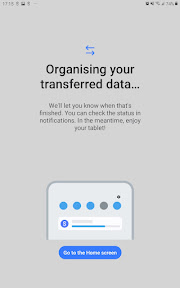
Samsung Smart Switch Mobile is a data-migration utility for Android and iOS users moving content to Samsung Galaxy devices.
The App DNA
What makes this app unique?
Users hire this app to minimize the friction of switching hardware, ensuring their personal data and settings persist on new devices.
For New and existing Samsung Galaxy users migrating data from legacy Android or iOS hardware.
What does it look like?
Key features
Transfers contacts, messages, and photos via cable or wireless.
Imports contacts and media from iCloud backups.
How much does it cost?
The app is a zero-cost acquisition tool for Galaxy hardware sales.
Velocity
Maintenance developmentperformanceopaqueShow more...
The app maintains a low-frequency release cadence, averaging approximately 0.12 releases per week over the last 6 months. Development is strictly focused on stability and wireless connection maintenance, with no evidence of new features or live-ops content. The release notes are consistently opaque, indicating a maintenance-only lifecycle. The development trend is stable at this low-intensity level, with no significant feature updates identified in the observed data.
Who built it?
Samsung Electronics Co.
13+ apps tracked · Utilities
 PENUP – Drawing-sharing SNS
 Samsung Find: Location Sharing
 Samsung TV
 Samsung Shop
 Samsung Notes
 Samsung Accessory Service
 Samsung Wallet (Samsung Pay)
 SmartThings
 Samsung Galaxy Watch (Gear S)
 Samsung Health
 Samsung Galaxy Buds
 Samsung SMART CAMERA App
User Sentiment
What do users think recently?
Review voice lately leans frustrated. Users appreciate successful data migration for users who experience a flawless transfer process, but report persistent connection failures during wireless or cable-based data transfer attempts.
How are ratings & reviews evolving?
Weekly average review rating
What users say, by theme
- Successful data migration for users who experience a flawless transfer process
- Persistent connection failures during wireless or cable-based data transfer attempts
93 of 93 recent reviews analyzed · high confidence · Frustrated overall
Read the full review analysisUnlock 1 user request, each backed by review evidence.
Access the full report for freeCompetition
Competitive landscape for Samsung Smart Switch Mobile
How's the Utilities market?
Samsung Smart Switch Mobile maintains a top-20 Tools category rank in major markets like KR and GB, reflecting its role as a mandatory onboarding utility. The high volume of reviews (510K+) confirms its status as the primary migration path for Galaxy hardware owners.
Read the market outlookThe rivals identified

By Google
Both applications serve as the primary migration utility for users transitioning to new Android hardware, directly competing for the same onboarding conversion funnel.
- Samsung Smart Switch Mobile supports wired data transfers, whereas Android Switch relies exclusively on wireless protocols.
- Samsung Smart Switch Mobile migrates system-level home screen layouts, a feature absent in the minimalist Android Switch.
 Transfer Data Between PhonesContender
 Copy data - device switchContender
 Smart Switch- Mobile transferContender
 Phone Transfer-Clone PhoneContender
 Smart Switch my Phone TransferContender
 Smart Switch - Phone CloneContender
 Transfer My ContactsContender
Unlock the head-to-head verdict: where this rival wins, and where it loses.
Access the full report for freeThe Analyst's Read
Key takeaways for Samsung Smart Switch Mobile
Where is it heading?
The market for device-migration tools is consolidating around native, system-level solutions that offer higher reliability than third-party utilities. Samsung Smart Switch remains exposed to churn as long as connection stability issues persist, so the team must shift from feature expansion to stability-first engineering to maintain the Galaxy acquisition funnel.
- Persistent connection drops during transfer attempts prevent successful migration, which directly erodes user trust in the Galaxy setup process.
- Forced update loops block users from accessing the app, leading to immediate abandonment and negative rating pressure on the Android store.
The SWOT
- Hardware-mapped QR scanning for device pairing
- Deep integration with Galaxy-specific system settings
- B2B distribution through retail-store setup partnerships
- Automated migration-success analytics for support teams
Next best moves
Rebuild connection-handshake logic because connection-drop is the top complaint → reduce setup abandonment
+ 1 more prioritized moveThe counter-intuitive read
The app's high review count is a liability, not an asset…
Read the full takeFeature gaps
Continuous cloud-based backup (available in Google One but missing here)
Since the last report: The app has transitioned into a maintenance-only phase, with user sentiment declining due to critical connection and update-loop failures that threaten the Galaxy hardware onboarding experience.
Bottom line
Samsung Smart Switch Mobile secures the Galaxy hardware funnel through essential migration tools, but persistent connection failures threaten the user experience, so the PM must prioritize stability fixes over new features to protect the onboarding conversion rate.
Unlock 2 critical frictions, 2 market threats, 1 more prioritized move and the analyst’s take.
Access the full report for freeReport last updated