


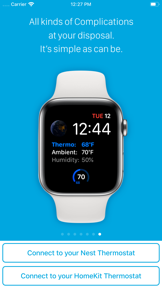


Thermo Watch is a utility app for iOS and Apple Watch that provides remote control and monitoring for Nest and Ecobee thermostats.
The App DNA
What makes this app unique?
It removes the friction of opening manufacturer-native apps by surfacing core temperature controls directly on the watch face and via Siri voice shortcuts.
For Apple ecosystem users who own Nest or Ecobee smart thermostats and require advanced watch-based control.
What does it look like?
Key features
Voice-activated control for Nest thermostats across iPhone, Watch, iPad, and HomePod.
Background-updating watch face widgets for monitoring thermostat status.
Automated Home/Away state switching based on user location.
How much does it cost?
The paid-upfront model positions the app as a utility tool, avoiding the recurring subscription fatigue seen in broader smart home services.
Velocity
Maintenance developmentUX improvementsplatform expansionperformanceShow more...
Thermo Watch for Nest & Ecobee operates on a maintenance cadence, with the latest release arriving 118 days ago. Development is characterized by long periods of inactivity punctuated by occasional platform-specific updates, such as the recent addition of an ecobee Home Screen widget. The app has seen a significant deceleration in activity compared to its earlier years, with the iOS platform remaining stagnant for nearly a year. Current efforts are focused on minor UX improvements and bug fixes rather than major feature expansion.
Who built it?
Marko Radakovic
6 apps tracked · Lifestyle
 Watch Cam for Nest Cam
 Uncharted Weather
 Totalizer - Watch Calculator
 Lock Keeper
 Solar Watch for SolarEdge
User Sentiment
What do users think recently?
Fresh user feedback skews frustrated. Users appreciate remote thermostat control functionality provides peace of mind for homeowners managing properties from distant locations and in-app diagnostic tools help users resolve wi-fi connectivity issues without needing to contact customer support, but report recent updates removed detailed energy usage reporting and run-time graphs that users relied on for monitoring.
How are ratings & reviews evolving?
What users say, by theme
- Remote thermostat control functionality provides peace of mind for homeowners managing properties from distant locations
- In-app diagnostic tools help users resolve Wi-Fi connectivity issues without needing to contact customer support
- Recent updates removed detailed energy usage reporting and run-time graphs that users relied on for monitoring
50 of 50 recent reviews analyzed · high confidence · Frustrated overall
Read the full review analysisUnlock 2 more frustration themes and 1 user request, each backed by review evidence.
Access the full report for freeCompetition
Competitive landscape for Thermo Watch for Nest & Ecobee
How's the Lifestyle market?
Thermo Watch maintains a specialized position in the Lifestyle category, holding a #61 Paid rank in the US. The reliance on a one-time purchase model differentiates it from subscription-heavy smart home competitors, though its utility is currently constrained by cloud-server latency.
Read the market outlookThe rivals identified

By Matthias Hochgatterer
Home+ 6 targets the same Apple HomeKit power-user segment as Thermo Watch, offering advanced automation and accessory management that overlaps with the thermostat control needs of the target audience.
- Home+ 6 provides configuration backup capabilities, whereas Thermo Watch lacks any data recovery or export features.
- Home+ 6 supports broad HomeKit accessory management, while Thermo Watch restricts functionality to Nest and Ecobee hardware.
- Home+ 6 offers advanced automation tools, contrasting with the rigid scheduling constraints reported by Thermo Watch users.
 SmartTemp: Home ControlContender
 Vine Smart ControlContender
 HomeRun 2 for HomeKitContender
 Casa - Smart Home ManagerContender
Unlock the head-to-head verdict: where this rival wins, and where it loses.
Access the full report for freeThe Analyst's Read
Key takeaways for Thermo Watch for Nest & Ecobee
Where is it heading?
The smart home utility market is consolidating around apps that offer reliable, low-latency performance. Thermo Watch is currently exposed due to its reliance on unstable cloud servers and the recent removal of key data features, which risks pushing users toward manufacturer-native apps.
- Recent feature regressions in reporting tools erode the value proposition for power users, leading to increased churn pressure.
- Persistent cloud-server latency forces users to rely on physical controls, which undermines the core utility of the app.
The SWOT
- System-level Apple Watch integration sustains daily utility
- Siri Shortcuts provide a frictionless voice-control layer
- Implementing local API control would eliminate cloud-server dependency
Next best moves
Restore run-time reporting graphs because their removal is the top-cited frustration in reviews → increase user satisfaction.
+ 1 more prioritized moveThe counter-intuitive read
The app's minimalist design is its greatest liability…
Read the full takeSince the last report: The removal of run-time reporting features and persistent cloud-server latency have significantly degraded the app's value proposition for power users. These regressions have shifted the user experience from a high-performance utility to one that frequently requires manual intervention at the physical thermostat.
Bottom line
Restoring granular data visualization would address the primary churn driver among power users. If the developer prioritizes local network control, the app can reclaim its value as a high-performance utility, preventing users from reverting to manufacturer-native apps due to cloud-server latency.
Unlock 2 critical frictions, 1 market threat, 1 more prioritized move and the analyst’s take.
Access the full report for freeFAQ
Is Thermo Watch worth paying for if I already have the Nest app?
Does Thermo Watch work if my internet goes down?
What is the difference between Thermo Watch and the native Ecobee app?
Are there free alternatives to Thermo Watch?
Sources
Report last updated