



Contacts To PDF File Converter is a utility for iOS that exports address book contacts into formatted PDF files for printing or archiving.
The App DNA
What makes this app unique?
Users report: The app removes the friction of manual contact transcription by automating document generation, serving users who need offline-accessible, standardized records of their address book.
For Individuals and professionals requiring a simple, secure method to archive or share contact information in a standardized document format.
What does it look like?
Key features
Converts address book contacts into neatly structured, readable PDF files.
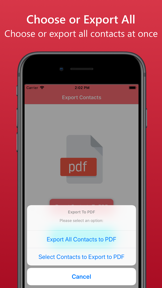
Allows users to export their entire contact list or hand-pick specific entries.
Provides a document preview before saving and supports sharing via email or cloud storage.
How much does it cost?
The 100-contact free limit serves as the primary conversion lever for the Pro tier.
Velocity
Steady developmentShow more...
Who built it?
Dropouts Technologies LLP
13+ apps tracked · Utilities
 Stop Scrolling Social Media
 Drunk Lock - Unlock Apps Sober
 Easy Unzip / Zip Files
 Check My Device : 40+ Tests
 Air Share: Backup or Copy Data
 Heart Words: AI Wishes/Status
 Predator Clock : Alarm Clock
 Blaze Video Downloader & Split
 Best Shayaris : Only the best selected shayaris !
 Super Backup & Storage Cleaner
 PDF to Photos - JPG / PNG
 Contacts to Excel , PDF , CSV
User Sentiment
What do users think recently?
How are ratings & reviews evolving?
Not enough recent reviews to extract reliable themes yet.
Read the full review analysisCompetition
Competitive landscape for Contacts To PDF File Converter
How's the Utilities market?
Contacts To PDF File Converter maintains a specialized position in the Utilities category with a 4.58 rating across 12 total reviews. Its focus on single-purpose PDF generation avoids the feature bloat of broader migration tools, though the limited review volume suggests a narrow, low-velocity user base.
The rivals identified

By Samsung Electronics Co., Ltd.
This app competes directly by offering comprehensive contact migration and management tools, serving as a primary utility for users moving or backing up address book data.
- Offers massive cross-platform ecosystem support that this app currently lacks entirely.
- Leverages deep integration with cloud services for automated, hands-free contact synchronization and backup.
- Provides a trusted, manufacturer-backed solution for data migration, reducing user concerns regarding data security.
 WPD Reader - for WordPerfectContender
 PrinterShare PremiumContender
 Save2PDF for iPhoneContender
 Unlock PDF - Password RemoverContender
Unlock the head-to-head verdict: where this rival wins, and where it loses.
Access the full report for freeThe Analyst's Read
Key takeaways for Contacts To PDF File Converter
Where is it heading?
The utility market for contact management is increasingly dominated by native OS features, leaving single-purpose converters in a defensive position. Contacts To PDF File Converter must leverage its offline-first, privacy-focused niche to retain users, as the lack of active feature investment signals a high risk of churn if native alternatives improve.
- The 200-day update gap suggests a maintenance-only posture, which limits the app's ability to respond to emerging OS-level PDF export improvements.
The SWOT
- Single-purpose PDF conversion workflow reduces user setup friction compared to multi-step migration tools
- Adding metadata-filtering or bulk-preview tools could differentiate the app from generic PDF converters
Next best moves
A/B test a tiered free-export limit because the 100-contact cap is a primary conversion barrier → increase Pro conversion rate
The counter-intuitive read
The app's lack of cloud-sync is a feature, not a bug…
Read the full takeFeature gaps
Advanced document merging (available in Save2PDF for iPhone but absent here) +1
Since the last report: The app's strategic outlook shifted from an aggressive B2B expansion plan to a defensive posture focused on privacy-centric differentiation. This pivot acknowledges the threat of native OS-level PDF export features and the risks associated with a 200-day update gap.
Bottom line
The app's value rests on its simplicity, but the lack of recent updates leaves it vulnerable to native OS feature expansion. A pivot toward conversion-funnel optimization would unlock revenue from the existing user base before the core utility is commoditized.
Unlock 1 critical friction, 1 market threat and the analyst’s take.
Access the full report for freeFAQ
Is Contacts To PDF File Converter free to use?
How does this app compare to Samsung Smart Switch?
Does the app require an internet connection to export contacts?
What are some alternatives for converting contacts to PDF?
Sources
- [1] App Store, source
Report last updated