


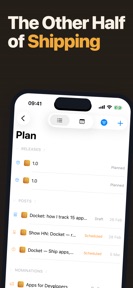
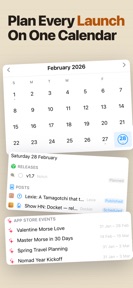
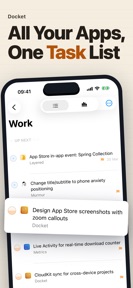

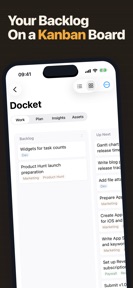

Docket is a project management tool for indie developers to track releases, marketing, and app ideas across iPhone, iPad, and Mac.
The App DNA
What makes this app unique?
The app removes the cognitive load of corporate project management tools by focusing exclusively on the release-ship-maintain cycle indie developers face.
For Indie developers managing multiple apps who require a focused, non-corporate project tracking tool.
What does it look like?
Key features
Built-in Model Context Protocol server and CLI tool allowing AI agents like Claude Code to read and write project data directly from the terminal.
Automated ingestion of app metadata, in-app events, and nominations from App Store Connect to maintain pipeline alignment.
Standardized workflow template covering build, QA, screenshots, metadata, and marketing tasks for every release.
How much does it cost?
The freemium model gates multi-project management and advanced developer integrations behind the Pro tier, directly targeting power users who manage portfolios.
Velocity
Maintenance developmentUX improvementsnew contentShow more...
The app currently ships at a maintenance cadence, with only one release recorded in the analyzed window. Development is focused on UX improvements and workflow integration, specifically regarding portfolio management and repository-based changelog generation. The latest release represents a major update to the app's core navigation and project tracking capabilities. There is no evidence of a high-frequency release cycle or live-ops strategy at this time.
Who built it?
Drobinin
9 apps tracked · Developer Tools
 Visa Day Tracker: Residency
 Intimacy Tracker: Silk
 murmur: ai practice calls
 Morse Code Translator: Glint
 Widgets for ASC: Metrics
 Fermentation Journal: Fermento
 Notch: Target Scoring Tracker
 Lexie: Language Tamagotchi
User Sentiment
What do users think recently?
How are ratings & reviews evolving?
Not enough recent reviews to extract reliable themes yet.
Read the full review analysisCompetition
Competitive landscape for Docket - Dev Release Tracker
How's the Developer Tools market?
Docket operates in the Developer Tools category, differentiating itself from general-purpose project management tools by anchoring workflows to App Store Connect data.
Read the market outlookThe rivals identified
Unlock the deeper market read.
Access the full report for freeThe Analyst's Read
Key takeaways for Docket - Dev Release Tracker
Where is it heading?
The market for developer-specific productivity tools is consolidating around integrations that reduce manual metadata entry. Docket's ability to sync directly with App Store Connect positions it well to retain indie developers who prioritize efficiency, provided the sync remains reliable as the store API evolves.
- The latest release introduced a portfolio control panel and App Store Connect sync, demonstrating active feature investment rather than maintenance-only updates.
- The current release cadence of one update every 39 days suggests a steady, predictable development cycle for the indie-focused feature set.
The SWOT
- App Store Connect synchronization anchors the release pipeline to live store metadata.
- Built-in MCP/CLI support enables AI-agent integration directly from the terminal.
- Pre-ship checklist standardizes the release process for indie developers.
- Expanding the developer calendar to include non-Apple milestones could capture cross-platform indie developers.
- Introducing team-based collaboration features could provide an upsell path for growing indie studios.
Next best moves
Expand free tier to two projects because single-project limits are a common barrier to entry for indie developers → increase top-of-funnel conversion
+ 1 more prioritized moveThe counter-intuitive read
The focus on indie developers is a strength…
Read the full takeBottom line
Docket provides a specialized, release-centric workflow that effectively differentiates itself from generic project management tools through App Store Connect integration. Prioritizing the stability of this sync mechanism will defend the core value proposition against generalist competitors.
Unlock 2 critical frictions, 2 market threats, 1 more prioritized move and the analyst’s take.
Access the full report for freeFAQ
Is Docket suitable for developers managing multiple apps?
How does Docket compare to general project management tools like Trello or Notion?
Does Docket require a paid subscription?
Sources
- [1] App Store, source
Report last updated