


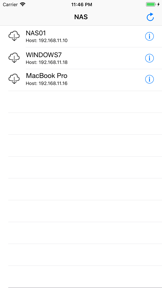

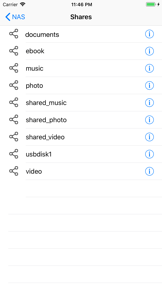
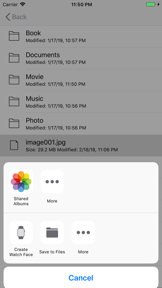
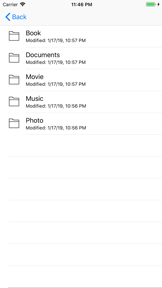

Easy NAS is a file management utility for iOS that enables users to transfer and access files from SMB-compliant network drives and shared folders.
Product velocity
Maintenance
Daily rank 🇺🇸
—
Lifestyle
Sentiment
2.5
2 reviews
Nemesis

Browser and Documents Manager
The App DNA
What makes this app unique?
Users hire this app to bridge the gap between local network storage and mobile media consumption, seeking a familiar interface to move files without complex manual configuration.
For Home and office users requiring direct access to local NAS devices or Windows/Mac shared folders from an iPhone.
What does it look like?
Key features
Combines Bonjour mDNS and IP scanning to locate SMB servers on local Wi-Fi without manual IP entry, reducing onboarding friction.
Provides directory navigation and file transfer capabilities for SMB-compliant network drives and shared folders.
Stores usernames and passwords locally to enable automatic login to registered servers, increasing session frequency.
How much does it cost?
The app is currently offered as a free utility with no visible subscription or IAP gates, relying on ad inventory for monetization.
Velocity
Maintenance developmentperformanceUX improvementsShow more...
The app has released three updates over the last nine months, averaging approximately one release every three months, which places it in the maintenance tier. Development is currently focused on minor stability and performance maintenance rather than significant feature expansion. The latest release includes small functional additions like video player gestures and file operation tweaks, but the overall cadence remains slow and stable. There is no evidence of a shift toward live operations or high-frequency feature delivery.
Who built it?
hirokazu murabe
13+ apps tracked · Lifestyle
 CallBell - Pager for Home Shop
 Karaoke Vocal Remove
 PopRush ペットモード付
 ヤメログ - やめる習慣記録
 PhotoFix - 写真から不要なものを削除・修復
 文字起こし翻訳
 安心ブラウザ - 有害サイトをブロック
 PhotoMotion: Stop Motion Maker
 BarcodeScan: Scan, Save, Email
 Music Sonic - Immersive Sound
 Flashcard Pro: Study & Learn
 TimeLog - Track your time
User Sentiment
What do users think recently?
The recent review mood reads thrilled. Users appreciate windows explorer-like file management interface provides high utility for organizing local and cloud storage and high performance and reliability during bulk file operations and cross-folder transfers, but report data loss incidents occurring during file move operations between folders.
How are ratings & reviews evolving?
What users say, by theme
- Windows Explorer-like file management interface provides high utility for organizing local and cloud storage
- High performance and reliability during bulk file operations and cross-folder transfers
- Versatile feature set including remote server connectivity and application management
- Data loss incidents occurring during file move operations between folders
51 of 51 recent reviews analyzed · high confidence · Thrilled overall
Read the full review analysisUnlock 1 more frustration theme and 1 user request, each backed by review evidence.
Access the full report for freeCompetition
Competitive landscape for Easy NAS - SMB File Manager
How's the Lifestyle market?
Easy NAS operates as a specialized utility in the Lifestyle category, but its 2.5-star rating across 51 reviews indicates significant performance friction compared to broader file management competitors. The lack of IAP or subscription tiers limits revenue potential while the ad-supported model creates user experience tension.
Read the market outlookThe rivals identified
By Download Apps
This app competes directly by offering a comprehensive file management suite that includes web browsing and document handling, overlapping with Easy NAS's core utility of transferring and accessing remote files.
- Includes an integrated web browser for direct file downloads, a feature missing in Easy NAS.
- Offers a mature, multi-year track record of file management stability compared to Easy NAS's limited footprint.
- Provides a broader ecosystem of document management tools beyond simple SMB network drive file transfers.
 Unarchiver : Zip UnzipContender
 AppCleaner - Clean StorageContender
 File Manager & File ViewerContender
 DATAMAGContender
Unlock the head-to-head verdict: where this rival wins, and where it loses.
Access the full report for freeThe Analyst's Read
Key takeaways for Easy NAS - SMB File Manager
Where is it heading?
Users report: The local network utility market is shifting toward integrated media playback and format conversion, and Easy NAS's maintenance-mode posture leaves it exposed. Unless the developer addresses the data-loss incidents immediately, the app will continue to lose ground to competitors that offer more reliable and comprehensive file-handling workflows.
- Persistent reports of data loss during file moves indicate a failure in the core utility, which will accelerate user churn into Q1.
- Recent updates focused on minor code maintenance rather than feature expansion, leaving the app vulnerable to more active, feature-rich competitors.
The SWOT
- Windows-style interface simplifies navigation for non-technical users
- Hybrid server discovery reduces manual configuration friction
- Dark mode implementation improves visual comfort for power users
Next best moves
Audit file-handling logic because data loss is the top-reported complaint → reduce churn
+ 1 more prioritized moveThe counter-intuitive read
The app's lack of a paid tier is a structural weakness…
Read the full takeFeature gaps
Integrated web browser for direct downloads (available in Browser and Documents Manager but missing here) +1
Bottom line
Easy NAS provides a useful interface for SMB management, but critical data loss incidents undermine its core utility, so the PM must prioritize stability fixes over new features to prevent total user churn.
Unlock 2 critical frictions, 2 market threats, 1 more prioritized move and the analyst’s take.
Access the full report for freeFAQ
Is Easy NAS safe for my files?
How does Easy NAS compare to other file managers?
Does Easy NAS work offline?
What is a free alternative to Easy NAS?
Sources
Report last updated