




EyeSpy Mouse Eyes is a macOS utility that adds animated, cursor-following eyes to the desktop environment.
The App DNA
What makes this app unique?
Users hire the app to add personality to their workspace and improve cursor visibility on large screens, serving a need for desktop customization.
For Mac users seeking whimsical desktop customization and playful interface enhancements.
What does it look like?
Key features
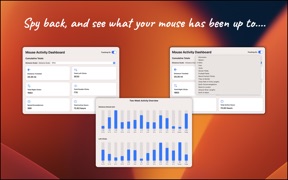
Interactive interface tracking mouse movements, clicks, and active hours
Visualizes mouse travel distance using non-standard units like Trips to Mordor
App resides in the macOS menu bar for background operation
How much does it cost?
The app is distributed as a free utility with no visible monetization gates, relying on voluntary support via Buy Me a Coffee.
Velocity
Dormant developmentShow more...
5 versions in history. Development pace: zombie.
Who built it?
Ori Roniger
13+ apps tracked · Entertainment
 Chodesh Hebrew Date & Calendar
 Tick-Dock
 MagicGlance
 MagicGlance Mouse
 EyeEase20
 Convertor
 Battery Plus Indicator
 Factastic
 TapWriter Pro
 MagicGlance Keyboard
 Sparkling Inspiration
 MagicGlance Trackpad
User Sentiment
What do users think recently?
Recent user voice shows a thrilled sentiment. Users appreciate visual tracking of cursor movement provides utility for users managing large desktop screen real estate.
How are ratings & reviews evolving?
What users say, by theme
- Visual tracking of cursor movement provides utility for users managing large desktop screen real estate
1 of 1 recent reviews analyzed · limited sample
Read the full review analysisUnlock 1 user request, each backed by review evidence.
Access the full report for freeCompetition
Competitive landscape for EyeSpy Mouse Eyes
How's the Entertainment market?
The rivals identified
Unlock the deeper market read.
Access the full report for freeThe Analyst's Read
Key takeaways for EyeSpy Mouse Eyes
Where is it heading?
The market for desktop customization remains niche but stable, with users favoring utilities that provide both aesthetic and functional value. The app is well-positioned for casual users, but the lack of multi-monitor support will continue to suppress adoption among power users until addressed.
- The latest release added an interactive dashboard, showing active feature investment rather than maintenance mode.
- The lack of multi-monitor support limits the app's utility for power users, creating a ceiling for growth.
The SWOT
- System tray integration ensures persistent background visibility
- Gamification of mouse metrics via dashboard increases session duration
- Education partnerships untapped as B2B distribution
- Category leader missing wearable integration
Next best moves
Ship multi-monitor support because it is the top-requested feature → increase utility for power users
The counter-intuitive read
The lack of monetization is not a weakness but a moat…
Read the full takeFeature gaps
Multi-monitor tracking (available in productivity utilities but missing here)
Since the last report: The app introduced gamified mouse tracking features while identifying significant functional gaps regarding multi-monitor support and long-term monetization.
Bottom line
The app successfully gamifies desktop interaction, but the lack of multi-monitor support limits its appeal to power users, so the PM should prioritize multi-monitor functionality to reduce churn risk.
Unlock 2 critical frictions, 2 market threats and the analyst’s take.
Access the full report for freeReport last updated