


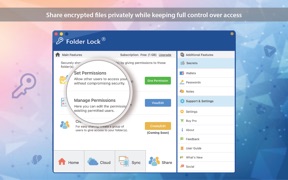


Folder Lock is a cross-platform encryption utility for macOS, Android, and iOS that secures files, folders, and sensitive credentials using AES-256 encryption. It distinguishes itself through 'Cloud Lockers' that encrypt data before cloud transit and a native macOS virtual drive experience. The app is currently facing a critical decline in user trust due to widespread reports of data loss and login failures following recent updates.
The App DNA
What makes this app unique?
For Privacy-conscious professionals, legal/financial consultants, and individuals requiring secure cross-platform document management.
What does it look like?
Key features
Military-grade encryption for files, folders, and sensitive data.
Encrypts files locally before uploading to Dropbox, Google Drive, or OneDrive.
Creates a secure virtual drive on macOS that functions like a native folder.
Allows for a fake login to hide real content and instant app-switching for emergencies.
How much does it cost?
The app uses a one-time purchase model for its Pro tier, which appeals to users averse to the subscription fatigue common in the utility category.
Velocity
Maintenance developmentperformanceShow more...
The app has not released a major feature update in the observed data, with the most recent activity limited to a minor compatibility patch on Android in November 2025. Development appears to be in maintenance mode, focusing solely on platform stability rather than new feature development. There has been no significant feature update since the start of the observed data set.
Who built it?
NewSoftwares.net
10 apps tracked · Utilities
 Folder Lock
 Calculator# Hide Photos Videos
 Social Media Vault
 Vault - Hide Photos and Videos
 Secure Gallery & Password Vault - Hide Photo Video
 Notes Lock – Password Note
 Cloud Secure
 Vault Pro - Hide Photos Videos
 Folder Lock Pro
User Sentiment
What do users think recently?
Fresh user feedback skews frustrated. Users appreciate privacy & ease of use, but report data loss & recovery failures.
How are ratings & reviews evolving?
What users say, by theme
- Privacy & Ease of Use
Unlock 1 more frustration theme, each backed by review evidence.
Access the full report for freeCompetition
Competitive landscape for Folder Lock: Protect Data
How's the Utilities market?
The rivals identified

By Legendary Software Labs LLC
The most dominant direct competitor in the vault sub-genre, matching this app's scale and maintaining an aggressive bi-weekly release cadence.
- Specialized media handling (in-app slideshows and video playback) vs. target's generic file-system approach.
- Break-in alerts with GPS tagging and photo capture of intruders—a security layer this app lacks.
- Decoy password system that opens a secondary 'fake' vault to mislead unauthorized users.
 Hide Photos Video -Hide it ProContender
 Vault - Hide photos & videosContender
 Secret Safe Lock Vault ManagerContender
 LockMyPix Secret Photo VaultContender
Unlock the head-to-head verdict: where this rival wins, and where it loses.
Access the full report for freeThe Analyst's Read
Key takeaways for Folder Lock: Protect Data
Where is it heading?
- High-frequency reports of data loss after updates indicate a critical failure in the QA/release process.
- Persistent 'no internet' login error is bricking accounts for long-term users.
- v10.1.9 (Mar 2026) macOS UI updates show continued investment in the professional desktop segment.
The SWOT
- Native macOS client with virtual drive functionality
- Broad file format support (Docs, Audio, Archives)
- Local encryption for third-party cloud storage
- Capture professional market by emphasizing Mac-to-Mobile sync
- Implement break-in alerts to match competitor security layers
- Develop local-only recovery key systems to bypass cloud login issues
Next best moves
Fix the 'no internet' login/reset bug
+ 2 more prioritized movesFeature gaps
Break-in alerts with GPS and photo capture (available in Private Photo Vault - Pic Safe) +3
Bottom line
Folder Lock is at a crossroads; its unique macOS integration and professional file support are being overshadowed by catastrophic stability issues. If the data loss and login bugs are not resolved immediately, the app will lose its legacy user base to more reliable ecosystems like Proton Drive.
Unlock 3 critical frictions, 3 market threats, 2 more prioritized moves and the analyst’s take.
Access the full report for freeReport last updated