


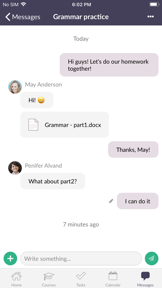
Itslearning mobile is an education companion app for students and teachers, providing access to course content, tasks, and bulletins on iOS and Android.
The App DNA
What makes this app unique?
Users hire the app to manage academic workflows and receive time-sensitive alerts, but the current web-view implementation fails to provide the reliability required for daily student use.
For Students and teachers enrolled in institutions that utilize the itslearning platform.
What does it look like?
Key features
Search and select specific school, district, or institution to authenticate via existing credentials
Aggregated view of course updates and bulletins on the home screen
Centralized list of assignments and follow-up tasks for students and teachers
How much does it cost?
The app functions as a free utility for existing institutional clients, requiring an account to access features.
Velocity
Steady developmentShow more...
Who built it?
itslearning AS
8 apps tracked · Education
 PersonaleIntra
 itslearning new
 ParentIntra 2
 itslearning Parents
 ElevIntra
 StudentIntra
 Parents
User Sentiment
What do users think recently?
The recent review mood reads frustrated. Users appreciate core functionality provides a reliable way for students to track course activities and assignments, but report technical instability causes the app to open multiple background instances during standard navigation.
How are ratings & reviews evolving?
What users say, by theme
- Core functionality provides a reliable way for students to track course activities and assignments
- Technical instability causes the app to open multiple background instances during standard navigation
78 of 99 recent reviews analyzed · high confidence · Frustrated overall
Read the full review analysisUnlock 1 more frustration theme and 1 user request, each backed by review evidence.
Access the full report for freeCompetition
Competitive landscape for itslearning mobile
How's the Education market?
The app maintains a 3.4 average rating across 19,678 total ratings, but the persistent technical regressions in the latest version limit its ability to compete with the high-frequency release cadence of Canvas.
Read the market outlookThe rivals identified

By Google
Both applications compete for the same K-12 and higher education student base by providing centralized assignment management and course bulletin distribution within institutional environments.
- Google Classroom provides automated assignment workflows and originality reports, while itslearning mobile lacks these native grading tools.
- Google Classroom integrates directly with the Google Workspace suite, whereas itslearning mobile relies on a web-view architecture.
 Canvas by InstructureContender
 MoodleContender
 Satchel OneContender
 LMS MMContender
 eLearning For You LMSContender
 Edportal LMS AppContender
 Bromcom Student AppContender
 Open-LMSContender

Unlock the head-to-head verdict: where this rival wins, and where it loses.
Access the full report for freeThe Analyst's Read
Key takeaways for itslearning mobile
Where is it heading?
The education market is shifting toward AI-native tools that automate student workflows, leaving static LMS companions exposed. Itslearning must move beyond maintenance-mode stability to address core navigation friction, or risk losing the student user base to more agile, AI-integrated competitors.
- Persistent technical regressions in the latest version (background crashes, web-view failures) drive continued negative sentiment and force students to desktop alternatives.
- The institutional login barrier provides a defensive moat, but the lack of native file handling leaves the user base vulnerable to AI-native study tools.
The SWOT
- School-specific login mechanism enables institutional adoption via existing identity providers
- Dedicated task tracker integration could capture student workflow management
Next best moves
Rebuild navigation logic to replace web-view components because navigation crashes are the top complaint → improve daily active habit
+ 1 more prioritized moveThe counter-intuitive read
The app's institutional login is not just a feature…
Read the full takeFeature gaps
Real-time LTI tool collaboration (available in Canvas but absent here) +1
Since the last report: The app's competitive position has declined due to technical instability and poor web-view performance, shifting the focus toward critical bug remediation and navigation overhauls.
Bottom line
The app provides essential institutional access, but technical instability in the latest version forces students to rely on desktop alternatives, so the PM must prioritize native navigation over feature expansion to prevent churn to AI-native competitors.
Unlock 2 critical frictions, 1 market threat, 1 more prioritized move and the analyst’s take.
Access the full report for freeReport last updated