




Keyring is a legacy iOS password manager that utilizes the open-source KeePass (.kdbx) format to provide local-first, secure storage. It targets privacy-conscious users who prefer open standards over proprietary cloud services. However, the app has not been updated since 2017, positioning it as a maintenance-mode utility that lacks modern iOS integrations like AutoFill and Files app support.
The App DNA
What makes this app unique?
For Privacy-conscious users who prefer open-source standards and require a simple, offline-capable password manager that integrates with the KeePass ecosystem.
What does it look like?
Key features
Uses the open-source KeePass format, allowing data portability and interoperability with various third-party apps.
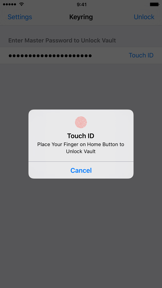
Supports Touch ID and Face ID for secure and quick vault unlocking.
Automatically locks the vault and clears the clipboard to prevent unauthorized access.
How much does it cost?
The app appears to be a legacy, community-focused utility with no active monetization strategy evident in the current metadata.
Velocity
Dormant developmentShow more...
The application has not received any updates in over 8 years, with the last recorded version being 1.23 released on November 8, 2017. There is no evidence of active development, feature releases, or maintenance patches. The app appears to be in a zombie state with no development momentum.
Who built it?
Sergey Pershenkov
3 apps tracked · Utilities
 QuietScrob – Last.fm Scrobbler
 Film Rolls – App for Film Photographers
User Sentiment
What do users think recently?
How are ratings & reviews evolving?
Not enough recent reviews to extract reliable themes yet.
Read the full review analysisCompetition
Competitive landscape for Keyring – Password Manager
How's the Utilities market?
The rivals identified

By Bitwarden Inc
Bitwarden is the leading open-source alternative, offering the transparency Keyring users value with a high development velocity of 12 releases in the last 6 months.
- Fully open-source codebase and self-hosting options provide a level of transparency that Keyring's closed-source model lacks.
- Includes 'Bitwarden Send' for secure, ephemeral sharing of text and files, moving beyond simple vault storage.
- Cross-platform synchronization across mobile, desktop, and all major browser extensions, whereas Keyring is limited to iOS.
 Enpass Password ManagerContender
 NordPass: Password ManagerContender
 Sticky Password Manager & SafeContender
Unlock the deeper market read.
Access the full report for freeThe Analyst's Read
Key takeaways for Keyring – Password Manager
Where is it heading?
- Last updated Nov 2017 (v1.23) — the app is in maintenance mode with no active feature investment.
- 2.8-star rating from only 15 reviews suggests a lack of user engagement and potential functional issues.
The SWOT
- Native support for open-source .kdbx format
- Local-first privacy architecture
- Completely free with no monetization friction
- Capture users migrating from centralized cloud managers due to privacy concerns
- Develop modern .kdbx clients to replace abandoned legacy tools
Next best moves
Prioritize iOS AutoFill and Files app integration
+ 2 more prioritized movesFeature gaps
Deep integration with iOS Files app and AutoFill (available in KeePassium) +3
Bottom line
Keyring is a stagnant legacy utility that is currently losing its niche to modern KeePass clients like KeePassium. While its commitment to open standards is a strength, the lack of updates since 2017 makes it a high-risk choice for users and a prime target for competitor poaching.
Unlock 3 critical frictions, 2 market threats, 2 more prioritized moves and the analyst’s take.
Access the full report for freeFAQ
Is Keyring good for syncing passwords between iPhone and Mac?
How does Keyring compare to KeePassium for KeePass files?
Is Keyring safe to use given it hasn't been updated since 2017?
What is a better free alternative to Keyring?
Report last updated