


Meeting Room 365 Display
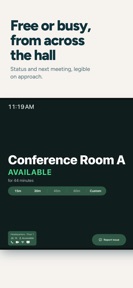
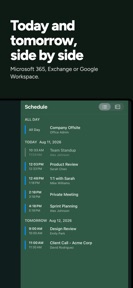


Meeting Room 365 Display is a native office scheduling app for iPad that provides kiosk-locked meeting room management for Microsoft 365 and Google Workspace.
The App DNA
What makes this app unique?
The app removes the connectivity dependency and browser-loading friction inherent in web-based room displays, ensuring meeting schedules remain visible even during network outages.
For IT and facilities teams in office environments managing meeting room availability across Microsoft 365, Google Workspace, and Exchange.
What does it look like?
Key features
Launches directly to the schedule without web views, utilizing Guided Access for kiosk locking.
Maintains display of current meetings during network outages and reconciles data automatically upon reconnection.
Supports remote configuration and management of display settings via Mobile Device Management software.
How much does it cost?
Subscription model anchored at $9/month per display, with a 10% discount for annual commitments to drive long-term retention.
Velocity
Maintenance developmentperformanceShow more...
Meeting Room 365 Display maintains a low-frequency update schedule, with 2 distinct versions released in the observed window. The latest release occurred 18 days ago, following a period of relative inactivity. Development is currently focused on stability and performance, as evidenced by the minor nature of recent updates. There is no indication of a shift toward live operations or frequent feature expansion.
Who built it?
Meeting Room 365
3 apps tracked · Business
 Meeting Room 365
 Visitor Check-in Kiosk
User Sentiment
What do users think recently?
How are ratings & reviews evolving?
Not enough recent reviews to extract reliable themes yet.
Read the full review analysisCompetition
Competitive landscape for Meeting Room 365 Display
How's the Business market?
Meeting Room 365 Display occupies a niche in the Business category, focusing on native reliability for office hardware. The $9/month price point targets enterprise IT budgets where uptime is the primary metric, distinguishing it from free, browser-based alternatives.
Read the market outlookThe rivals identified
Unlock the deeper market read.
Access the full report for freeThe Analyst's Read
Key takeaways for Meeting Room 365 Display
Where is it heading?
The market for office-scheduling displays is shifting toward native, hardware-integrated solutions that minimize IT overhead. Meeting Room 365 Display is well-positioned to retain its base by prioritizing uptime, but it must deepen its hardware-integration capabilities to avoid being displaced by platform-native tools.
- The maintenance-only release cadence indicates a focus on infrastructure stability, which aligns with the needs of enterprise IT administrators.
- Offline resilience remains a strong differentiator, as it prevents the meeting-room confusion that occurs when network connectivity drops in office environments.
The SWOT
- Native architecture eliminates browser-based loading delays
- Offline-caching mechanism ensures meeting visibility during network instability
- Expansion into presence-detection hardware via IFTTT integration
Next best moves
Audit IFTTT integration performance because presence detection is a key differentiator → increase retention
The counter-intuitive read
The maintenance-only release cadence is a feature, not a bug…
Read the full takeBottom line
Meeting Room 365 Display maintains a stable position by solving the connectivity failures of web-based displays, but the lack of recent feature expansion leaves it vulnerable to platform-native bundling. Focusing on hardware-integration depth would lock in enterprise users.
Unlock 2 critical frictions, 1 market threat and the analyst’s take.
Access the full report for freeFAQ
Is Meeting Room 365 Display suitable for large office rollouts?
Does Meeting Room 365 Display work if the office Wi-Fi goes down?
What is the difference between Meeting Room 365 Display and the Classic version?
Sources
- [1] App Store listing
Report last updated