


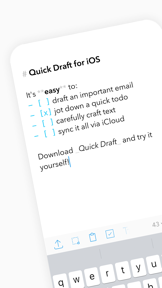



Quick Draft is a lightweight markdown notepad for iOS that enables rapid text capture and checklist management.
The App DNA
What makes this app unique?
The app removes the cognitive load of complex note-taking interfaces, serving users who need to document ideas instantly without navigating feature-heavy dashboards.
For Students, writers, and professionals requiring a lightweight, distraction-free scratchpad for quick text capture and markdown drafting.
What does it look like?
Key features
Converts plain text into structured notes, serving as a core utility for writers.
Synchronizes content across Apple devices, providing basic cross-device continuity.
Supports x-callback-url for automation workflows, enabling integration with advanced productivity setups.
How much does it cost?
The app operates as a free utility with no visible monetization gates, prioritizing user acquisition over immediate revenue.
Velocity
Dormant developmentopaqueShow more...
The app has been inactive for over a year, with the last recorded update occurring on March 22, 2025. Given the current date of May 2026, the development cycle has effectively ceased. There is no evidence of ongoing maintenance, feature development, or live operations. The project appears to be in a zombie state.
Who built it?

User Sentiment
What do users think recently?
How are ratings & reviews evolving?
Not enough recent reviews to extract reliable themes yet.
Read the full review analysisCompetition
Competitive landscape for Notepad Markdown: Quick Draft
How's the Productivity market?
Quick Draft occupies a niche, free-utility space in the Productivity category with a 4.65-star rating across 98 reviews. The absence of monetization gates contrasts with the subscription-heavy models of primary rivals, positioning it as a low-friction alternative for casual users.
Read the market outlookThe rivals identified

By Evernote Corporation
Evernote competes directly by dominating the note-taking market with a comprehensive suite of organizational tools that target the same productivity-focused user base as Quick Draft.
- Advanced web clipping capabilities allow users to save entire webpages directly into their note library.
- Integrated AI-powered note tools provide automated summarization and organization that Quick Draft currently lacks.
- Robust document scanning features turn physical paperwork into searchable digital assets within the app ecosystem.
 Quorum MobileContender
 Flexcil Note & Good PDF ReaderContender
 Chartnote MobileContender
 Capy - AI Meeting TranslatorContender
Unlock the head-to-head verdict: where this rival wins, and where it loses.
Access the full report for freeThe Analyst's Read
Key takeaways for Notepad Markdown: Quick Draft
Where is it heading?
The productivity market is consolidating around AI-integrated note-taking tools that automate documentation. Quick Draft's current maintenance-mode posture leaves it vulnerable to churn, as users increasingly prioritize automated summarization and cross-platform depth over simple text capture.
- The 13-month update silence signals a maintenance-only posture, which erodes user trust as competitors ship AI-driven features at a higher cadence.
The SWOT
- Minimalist interface reduces cognitive load for rapid capture
- Markdown syntax provides structured note utility without bloat
- Introduce template support to compete with specialized documentation tools
- Implement a Pro tier for advanced markdown features
Next best moves
Audit the codebase for a minor feature release because the 13-month silence risks user churn to active rivals → restore brand relevance
The counter-intuitive read
The app's lack of monetization is its biggest risk…
Read the full takeFeature gaps
AI-powered note summarization (available in Evernote but absent here) +2
Since the last report: The development cycle remains in a zombie state, with the primary shift being a strategic pivot toward addressing feature parity gaps to mitigate churn to AI-integrated competitors.
Bottom line
Users report: The app's minimalist design retains a loyal base, but the 13-month development silence leaves it exposed to AI-integrated rivals. A minor feature release would signal active support and prevent the user base from migrating to more dynamic, feature-rich alternatives.
Unlock 2 critical frictions, 2 market threats and the analyst’s take.
Access the full report for freeFAQ
Is Quick Draft suitable for professional note-taking?
How does Quick Draft compare to Evernote?
What is a free alternative to Quick Draft?
Sources
- [1] App Store, source
Report last updated