





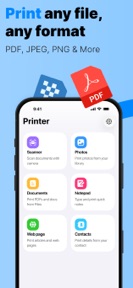


Printer – Smart Print printing is a utility for iPhone and iPad that enables direct printing of documents and photos to AirPrint-enabled printers.
The App DNA
What makes this app unique?
The app removes the friction of transferring files to a computer for printing, serving users who need a mobile-first output solution.
For iPhone and iPad users who need a direct, mobile-first solution for printing documents and photos without using a computer.
What does it look like?
Key features
Direct communication with AirPrint-enabled printers on the local network.
Allows printing of documents exactly one page in length without a subscription.
Enables printing of documents exceeding one page in length.
How much does it cost?
The freemium model uses a page-count threshold as the primary conversion gate to capture power users.
Velocity
Maintenance developmentperformanceShow more...
The app is currently in a maintenance phase, with only one release recorded in the analyzed window. The latest release provided no new features or content, focusing exclusively on performance and stability. With 96 days since the last update, development momentum is minimal. The publisher maintains a low-frequency release cycle typical of utility apps that have reached a stable state.
Who built it?
Libra Capital
2 apps tracked · Utilities
 TV Remote – Control Universal
User Sentiment
What do users think recently?
How are ratings & reviews evolving?
Not enough recent reviews to extract reliable themes yet.
Read the full review analysisCompetition
Competitive landscape for Printer – Smart Print printing
How's the Utilities market?
Printer – Smart Print printing operates in the Utilities category with a freemium model. The reliance on a subscription for multi-page documents creates a monetization friction point for casual users who expect basic document management as a standard utility.
Read the market outlookThe rivals identified
Unlock the deeper market read.
Access the full report for freeThe Analyst's Read
Key takeaways for Printer – Smart Print printing
Where is it heading?
The mobile printing market is increasingly commoditized by native OS features, leaving standalone utilities like Printer – Smart Print printing exposed to low-frequency usage patterns. Without a shift toward one-time purchase models or expanded document-management utility, the app will likely remain a niche tool for users with specific AirPrint compatibility needs.
- The maintenance-only update cadence suggests a stable, low-investment posture that prioritizes basic utility over new feature expansion.
The SWOT
- AirPrint-native architecture removes third-party driver dependencies.
- One-time purchase options to capture subscription-averse users.
Next best moves
Introduce a one-time purchase option because subscription-only models create high conversion friction in utility categories → increase conversion rate
The counter-intuitive read
The subscription-first model for a basic utility tool…
Read the full takeBottom line
Printer – Smart Print printing maintains a functional utility for single-page output, but the multi-page subscription gate limits its funnel in a category where native OS features provide baseline parity.
Unlock 1 critical friction, 1 market threat and the analyst’s take.
Access the full report for freeFAQ
Is Printer – Smart Print printing free to use?
Does Printer – Smart Print printing work with all printers?
What is the difference between the free and premium versions?
Sources
- [1] App Store, source
Report last updated