


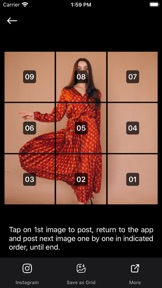


Profile Picture Border Frames is a photo editing utility for social media users, offering border frames and grid-slicing tools on iOS and Android.
The App DNA
What makes this app unique?
Users hire this app to bypass platform-specific cropping constraints and improve profile aesthetics, serving the job of social media content preparation.
For Social media users seeking to customize profile aesthetics and layout for Instagram, WhatsApp, and TikTok.
What does it look like?
Key features
Applies decorative circular or square borders to user profile photos for social media platforms
Slices single images into 3x1 through 3x5 grids for Instagram profile layouts
Adjusts image aspect ratios to fit social media platform requirements without cropping
How much does it cost?
Monetization relies entirely on ad-supported inventory within a free-to-use utility model.
Velocity
Active developmentShow more...
3 versions in history. Development pace: active.
Who built it?
Jatin Maniya
13+ apps tracked · Photo & Video
 Image to PDF Converter +
 MX Player - Video Player
 Passport Size Photo Maker App
 Beauty Camera : Makeup Plus
 Fashion Show - Dress Up Games
 AI Background Remover : Eraser
 Shoot The Island
 Video Maker Photo With Song
 Gps Map Camera - Timestamp
 Battery Charging Animations
 Interest Calculator: Finance
 Tap Away - Cube Puzzle Game
User Sentiment
What do users think recently?
How are ratings & reviews evolving?
Not enough recent reviews to extract reliable themes yet.
Read the full review analysisCompetition
Competitive landscape for Profile Picture Border Frames
How's the Photo & Video market?
The app maintains a 4.4 rating on Android with over 7,000 ratings, positioning it as a stable utility in the crowded photo-editing space. The lack of a premium tier limits revenue per user compared to AI-focused rivals.
Read the market outlookThe rivals identified

By JUPITER PALACE PTE. LTD.
Directly competes in the grid-layout and photo-slicing niche with high-frequency updates.
- Offers integrated video collage tools that expand beyond static grid slicing functionality.
- Maintains a high release cadence of 16 updates in six months to ensure platform compatibility.

Unlock the deeper market read.
Access the full report for freeThe Analyst's Read
Key takeaways for Profile Picture Border Frames
Where is it heading?
The photo utility market is consolidating around AI-driven generative tools, leaving manual-editing apps like this one vulnerable to churn. The PM must transition from simple utility to template-based workflows to remain relevant against high-frequency competitors.
- The lack of AI-driven editing features creates a widening gap with market leaders, which will likely accelerate user migration to AI-first editors.
- Consistent updates to border styles and photo tools demonstrate active maintenance, which helps retain the existing casual user base.
The SWOT
- High-utility grid-slicing tool drives repeat usage
- Ad-supported model captures inventory from casual users
- Direct social sharing hooks lower acquisition costs
- Develop AI-based background removal tools
- Introduce premium subscription tier to reduce ad-dependency
- Expand into wearable-specific profile frames
Next best moves
Ship cloud-save functionality because it is a standard utility expectation → reduce churn
+ 1 more prioritized moveThe counter-intuitive read
The app's reliance on ad-supported inventory is a strength, not a weakness…
Read the full takeFeature gaps
Integrated video collage tools (available in PhotoGrid) +2
Since the last report: The intelligence profile expanded significantly to include a competitive landscape and SWOT analysis, highlighting a strategic need to pivot from manual grid-slicing to template-based workflows.
Bottom line
The app maintains a stable utility base through grid-slicing, but the lack of AI-driven automation leaves it exposed to faster-moving rivals, so the PM should prioritize template-based workflows to defend against collage-focused competitors.
Unlock 3 critical frictions, 3 market threats, 1 more prioritized move and the analyst’s take.
Access the full report for freeReport last updated