


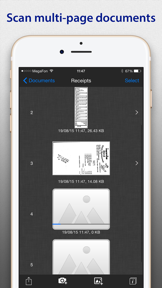
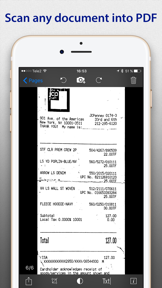
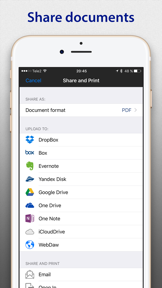

SharpScan is a high-speed document scanner and OCR utility for iOS that converts physical documents into compressed PDF files.
The App DNA
What makes this app unique?
Users hire SharpScan to digitize receipts and business cards quickly on the go, prioritizing file size and image clarity over complex cloud-based document management.
For Busy professionals and mobile users who need to digitize receipts, business cards, and documents quickly while on the go.
What does it look like?
Key features
True Black and White image processing produces files up to 20 times smaller than standard JPEGs without pixel loss.
Recognizes and extracts text from images in over 50 languages.
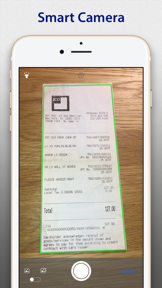
Fully automatic boundary detection, perspective correction, and cropping without manual interaction.
How much does it cost?
Freemium model uses ad-supported free access to drive volume, with specific functional gates like OCR text sharing acting as paid conversion points.
Velocity
Dormant developmentperformanceUX improvementsShow more...
The app has been inactive for over 99 months, with no updates since early 2018. The development history shows a complete cessation of activity, effectively classifying it as a zombie project. There is no evidence of ongoing maintenance, feature development, or live operations support.
Who built it?
Pixelnetica
6 apps tracked · Business
 EasyScan: PDF Doc Scanner
 EasyScan: OCR PDF Doc Scanner
 SharpScan: PDF OCR doc scanner
 SharpScan Pro: PDF OCR scanner
 SharpScan Pro: OCR PDF scanner
User Sentiment
What do users think recently?
Review voice lately leans mixed. Users appreciate high-quality document stabilization.
How are ratings & reviews evolving?
What users say, by theme
- High-quality document stabilization
- Watermark on free documents
Competition
Competitive landscape for SharpScan: PDF scanner + OCR
How's the Business market?
SharpScan maintains a niche position in the Business category with a 3.94 rating across 16 ratings, reflecting a low-volume utility footprint. The lack of cloud-sync features relative to market leaders limits its growth in the professional document management segment.
Read the market outlookThe rivals identified

By Easy inc.
This app is the primary market leader in the document scanning category, directly competing for the same user base seeking high-volume, reliable OCR and document digitization.
- Massive user base and review volume create a significant barrier to entry for new competitors
- Advanced cloud synchronization features allow for seamless multi-device document management that SharpScan currently lacks
- Robust PDF encryption capabilities provide enterprise-grade security features that appeal to professional and privacy-conscious users
 Clean My iPhoneContender
 Clever Cleanup: Phone CleanerContender
 DataSense MobileContender
 Document Scanner・Photo to PDFContender
Unlock the head-to-head verdict: where this rival wins, and where it loses.
Access the full report for freeThe Analyst's Read
Key takeaways for SharpScan: PDF scanner + OCR
Where is it heading?
The document scanning market is consolidating around all-in-one utility bundles that include signing and cloud-sync, leaving SharpScan's single-purpose model increasingly exposed. Without a pivot to modern storage workflows, the app will likely continue to lose share to competitors that solve the full document lifecycle.
- The lack of updates since 2018 signals a maintenance-mode posture, which leaves the app vulnerable to feature-rich competitors.
- The stable 3.94 rating indicates a loyal core user base that values the specific compression utility over modern feature sets.
The SWOT
- Lossless compression algorithm produces 20x smaller files
- Non-destructive image editing allows flexible post-scan adjustments
- Integration with enterprise cloud storage providers
- Addition of signature annotation tools
Next best moves
Ship native cloud storage integration because manual export is the primary friction point → increase retention
+ 1 more prioritized moveThe counter-intuitive read
The app's lack of cloud-sync is not just…
Read the full takeFeature gaps
Cloud synchronization (available in Simple Scan but missing here) +1
Since the last report: The app's competitive narrative shifted from addressing post-update image quality bugs to prioritizing cloud-native synchronization to remain relevant against modern utility bundles.
Bottom line
SharpScan excels at high-speed, low-footprint digitization, but the lack of cloud synchronization and aggressive watermarking limits its professional viability, so the team must prioritize cloud-native workflows to remain competitive.
Unlock 2 critical frictions, 2 market threats, 1 more prioritized move and the analyst’s take.
Access the full report for freeReport last updated