


Simple Notes - Notepad Manager
By Komorebi

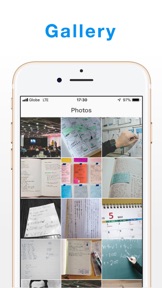

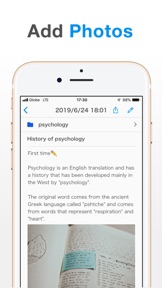


Simple Notes is a high-performance, offline-capable notepad manager for casual users on iOS.
The App DNA
What makes this app unique?
It removes the friction of account registration and recurring subscription fees for users who prioritize privacy and simplicity over complex formatting.
For Casual users seeking a simple, offline-capable note-taking tool without the complexity of account registration or subscription fees.
What does it look like?
Key features
Categorize notes with 24 color options to manage digital workspaces. Revenue link: Brand and moat, increases user investment in the app interface.
Visual organization of notes by date. Revenue link: Retention, compounds session frequency via chronological navigation.
Export notes as RTFD files with embedded images. Revenue link: Premium-tier gate, direct paid-conversion lever for power users.
How much does it cost?
Freemium model utilizing a one-time purchase for ad removal rather than recurring subscriptions, lowering the barrier to entry for long-term users.
Velocity
Steady developmentShow more...
Who built it?
Komorebi
13+ apps tracked · Productivity
 Shopping List: Grocery To Do
 Simple Diary - journal w/ lock
 Shopping List: My Grocery List
 SmartDiet: Weight Loss Tracker
 QR Code Reader Pro - Barcode
 QR Code Reader - QR Scanner
 Simple Calendar - easy planner
 白色申告の確定申告アプリ Kaikei Lite
 Notes - Simple notepad, memo
 Simple To Do List: Daily Tasks
 QR Code Reader: Quick Scan
 Simple Calendar: ToDo Planner
User Sentiment
What do users think recently?
Review voice lately leans excited. Users appreciate simple and clean interface design allows users to organize notes without unnecessary feature bloat and one-time purchase model provides a cost-effective alternative to subscription-based note-taking applications.
How are ratings & reviews evolving?
What users say, by theme
- Simple and clean interface design allows users to organize notes without unnecessary feature bloat
- One-time purchase model provides a cost-effective alternative to subscription-based note-taking applications
- Customizable folder and color-coding system helps students and professionals maintain organized digital workspaces
- Lack of text formatting options like bold, italics, and underline limits the utility for detailed writing
34 of 34 recent reviews analyzed · high confidence · Excited overall
Read the full review analysisUnlock 2 more frustration themes and 3 user requests, each backed by review evidence.
Access the full report for freeCompetition
Competitive landscape for Simple Notes - Notepad Manager
How's the Productivity market?
Simple Notes maintains a 4.73-star rating across 777 total ratings, positioning itself as a high-satisfaction niche tool for users rejecting subscription-based productivity apps. The app's focus on one-time monetization creates a distinct barrier against subscription-heavy rivals.
Read the market outlookThe rivals identified
Unlock the deeper market read.
Access the full report for freeThe Analyst's Read
Key takeaways for Simple Notes - Notepad Manager
Where is it heading?
The note-taking market is consolidating around cross-device synchronization, leaving Simple Notes exposed to churn from users who adopt tablets alongside phones. Simple Notes must bridge this sync gap to remain relevant for professional use cases, or risk being relegated to a secondary, single-device tool.
- Missing cross-device synchronization forces manual data management, which compounds user frustration and limits the app to single-device use cases.
- The one-time purchase model remains a strong differentiator against subscription-heavy productivity apps, sustaining a high 4.73-star rating.
The SWOT
- One-time purchase model removes recurring cost barriers
- 24-color folder system enables structured organization
- Offline-first architecture ensures data accessibility
- Implement iCloud sync to capture multi-device users
- Add basic text styling to increase professional adoption
- Introduce local PC backup for privacy-conscious segments
Next best moves
Ship automatic iCloud synchronization because it is the top-requested feature → increase retention among multi-device users
+ 1 more prioritized moveThe counter-intuitive read
The lack of subscription fees is a retention risk: without recurring revenue…
Read the full takeSince the last report: The transition to a freemium pricing model and the introduction of data export features mark a shift toward active monetization. These changes are balanced by user-reported friction regarding the lack of text formatting and cross-device synchronization.
Bottom line
Simple Notes retains casual users through its no-subscription value proposition, but the lack of cross-device synchronization creates a ceiling for professional utility. Addressing this sync gap would unlock higher retention among multi-device users, preventing churn to subscription-based alternatives.
Unlock 3 critical frictions, 2 market threats, 1 more prioritized move and the analyst’s take.
Access the full report for freeFAQ
Is Simple Notes free to use?
Does Simple Notes sync across devices?
Can I format my notes with bold or italics?
What is a good alternative to Simple Notes?
Sources
- [1] App Store
Report last updated