


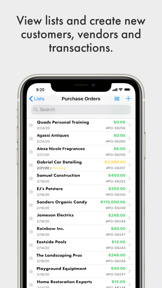
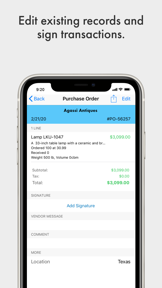
SOS Inventory Software is a business management tool for QuickBooks Online users that handles inventory, manufacturing, and order fulfillment on iOS.
The App DNA
What makes this app unique?
It removes the financial barrier to advanced ERP features for small businesses by integrating directly into existing accounting workflows.
For Small to medium-sized businesses using QuickBooks Online that require advanced inventory, manufacturing, and order management capabilities.
What does it look like?
Key features
Synchronizes inventory, sales orders, and manufacturing data directly with QuickBooks Online accounts.
Mobile-based barcode scanning for reconciling actual stock against logged inventory numbers.
Manages bills of materials, work orders, and job costing for production workflows.
How much does it cost?
Subscription model tiered by feature depth, with annual billing options offering two months free to increase customer lifetime value.
Velocity
Maintenance developmentperformanceShow more...
The app is currently in a maintenance phase, with only one release shipped in the last 167 days. Development is focused exclusively on addressing technical debt, including crash resolutions and inventory display fixes. There is no evidence of new feature development or live operations. The current cadence reflects a long-term stability focus rather than active product growth.
Who built it?
User Sentiment
What do users think recently?
Review voice lately leans frustrated. Users appreciate the app provides full functional access to business management tools for users on the go.
How are ratings & reviews evolving?
What users say, by theme
- The app provides full functional access to business management tools for users on the go
- Manual cache updates force users to wait for extended periods during routine navigation tasks
4 of 4 recent reviews analyzed · limited sample
Read the full review analysisUnlock 2 more frustration themes and 2 user requests, each backed by review evidence.
Access the full report for freeCompetition
Competitive landscape for SOS Inventory Software
How's the Business market?
SOS Inventory Software serves a niche segment of QuickBooks Online users, maintaining a 4.22 rating across 81 reviews. Its pricing structure targets businesses seeking ERP functionality at a fraction of the cost of enterprise-grade software.
The rivals identified
The Analyst's Read
Key takeaways for SOS Inventory Software
Where is it heading?
The market for QuickBooks-integrated inventory management is consolidating, with users increasingly expecting cloud-native performance. SOS Inventory Software's reliance on manual cache management leaves it vulnerable to competitors that offer instant data synchronization, which is the primary driver of user frustration.
- Manual cache updates force users to wait for extended periods, which erodes the daily active habit and drives negative sentiment.
- The latest release added mobile purchase order approval, showing active feature investment despite the long update cadence.
The SWOT
- QuickBooks Online integration automates data flow across sales and manufacturing workflows
- Mobile barcode scanning enables real-time reconciliation of physical stock against logged numbers
- Implementing automatic background synchronization would remove the primary user-reported friction point
- Adding visual item thumbnails would improve navigation efficiency for warehouse staff
Next best moves
Ship automatic background cache synchronization because it is the top-requested feature to eliminate navigation delays → reduce churn
+ 1 more prioritized moveThe counter-intuitive read
The slow 24-week update cadence is a feature, not a bug…
Read the full takeSince the last report: The intelligence profile shifted from a purely negative maintenance assessment to a mixed outlook, acknowledging that the recent feature additions provide value to this app B2B audience despite persistent performance friction.
Bottom line
SOS Inventory Software retains core users via deep QuickBooks Online integration, but the manual cache management bottleneck creates a persistent churn risk. Addressing this technical debt would stabilize the user experience and protect the current subscription base from cloud-native rivals.
Unlock 2 critical frictions, 1 market threat, 1 more prioritized move and the analyst’s take.
Access the full report for freeFAQ
Is SOS Inventory Software suitable for small businesses?
Does SOS Inventory Software work offline?
How does SOS Inventory Software compare to other inventory tools?
Sources
- [1] App Store, source
Report last updated