




Superhuman Mail for EMM is a productivity-focused email client for enterprise users, designed for rapid inbox management via AI and keyboard shortcuts.
The App DNA
What makes this app unique?
Professionals use the app to reduce the time spent on daily email triage, displacing standard clients that lack high-velocity automation tools.
For Enterprise professionals and teams requiring high-speed email management, CRM integration, and secure mobile device management.
What does it look like?
Key features
Automatically sorts incoming email into customizable categories based on sender or tool integration.
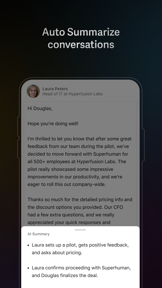
Generates draft replies from short phrases and provides one-line conversation summaries.
Shares live views of emails with team comments and read statuses without forwarding or BCC.
How much does it cost?
Subscription model focused on B2B productivity, with specific builds gated for enterprise security compliance.
Velocity
Maintenance developmentopaqueperformanceShow more...
Superhuman Mail for EMM has been in a maintenance cycle for over three months, with the latest release occurring 107 days ago. Development activity is limited to minor bug fixes and performance improvements, with no evidence of new features or live operations. The release notes remain consistently opaque, providing no insight into the technical focus of the updates. Given the lack of activity since April 2026, the development momentum is currently stagnant.
Who built it?
Superhuman Labs
3 apps tracked · Productivity
 Superhuman Mail
 Superhuman Mail
User Sentiment
What do users think recently?
Review voice lately leans mixed. Users appreciate minimalist interface design reduces cognitive load and makes daily email management feel significantly more efficient and snooze and follow-up reminder features help users manage urgent tasks without derailing their daily workflow, but report frequent application crashes during core tasks like composing or reading emails disrupt the professional workflow.
How are ratings & reviews evolving?
What users say, by theme
- Minimalist interface design reduces cognitive load and makes daily email management feel significantly more efficient
- Snooze and follow-up reminder features help users manage urgent tasks without derailing their daily workflow
- Keyboard shortcuts and gesture controls enable power users to process large volumes of email rapidly
- Frequent application crashes during core tasks like composing or reading emails disrupt the professional workflow
50 of 50 recent reviews analyzed · high confidence · Mixed overall
Read the full review analysisUnlock 2 more frustration themes and 3 user requests, each backed by review evidence.
Access the full report for freeCompetition
Competitive landscape for Superhuman Mail for EMM
How's the Productivity market?
Superhuman Mail for EMM targets the high-end productivity segment, where its premium subscription model contrasts with the feature-parity expectations of power users. The lack of mobile calendar integration creates a functional gap against broader enterprise suites.
Read the market outlookThe rivals identified

By Readdle Technologies Limited
Directly mirrors Superhuman's AI drafting, team collaboration, and 'Smart Inbox' triage features for high-performance professionals.
Superhuman Mail for EMM vs Email - Edison Mail Newton Mail - Email AppContender
 Spike AI: Productivity ToolContender
 Airmail for Gmail Outlook MailContender
 Polymail: Email InboxContender
Unlock the deeper market read.
Access the full report for freeThe Analyst's Read
Key takeaways for Superhuman Mail for EMM
Where is it heading?
The enterprise email market is consolidating around suites that offer deep calendar and task integration. Superhuman Mail for EMM remains exposed due to its maintenance-only update cadence and lack of mobile feature parity, which will likely accelerate churn among users who require a unified daily workflow.
- Frequent crashes during core tasks disrupt professional workflows, which erodes user trust and limits daily active usage.
- The lack of feature parity on Android compared to iOS/desktop drives negative sentiment and churn among cross-platform power users.
The SWOT
- Keyboard-shortcut workflow enables rapid email processing
- AI-native drafting reduces cognitive load for professional correspondence
- Localized feature parity for Android users to reduce churn
- Integration of native swipe-to-triage gestures
Next best moves
Ship mobile calendar integration because it is the top-requested missing feature → reduce app-switching churn
+ 1 more prioritized moveThe counter-intuitive read
The app's maintenance-mode status is a strategic choice to preserve the premium brand…
Read the full takeFeature gaps
Calendar integration (available in standard email clients but absent here) +1
Since the last report: Development activity has ceased for over three months, resulting in a stagnant maintenance cycle that exacerbates existing stability issues and feature gaps. User sentiment has declined as technical performance regressions and opaque monetization practices increasingly alienate the professional user base.
Bottom line
Stabilizing the composition flow would address the primary churn driver, while mobile calendar integration is required to justify the premium subscription cost. Prioritizing these core functional gaps will unlock the retention potential of the existing power-user base.
Unlock 3 critical frictions, 2 market threats, 1 more prioritized move and the analyst’s take.
Access the full report for freeFAQ
Is Superhuman Mail for EMM right for casual users?
How does Superhuman Mail compare to standard email apps?
Are there hidden costs in the sign-up process?
What are some alternatives to Superhuman Mail?
Sources
Report last updated