


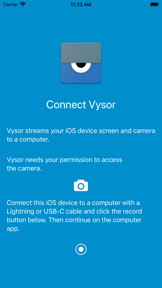


Vysor is a productivity utility for Android and iOS that enables screen mirroring and remote device control from a desktop computer.
The App DNA
What makes this app unique?
Developers and power users hire Vysor to replace physical device interaction with mouse and keyboard input, reducing the need for emulators during testing.
For Android and iOS developers needing physical device testing, and power users requiring remote mobile device control.
What does it look like?
Key features
View and interact with mobile screens using desktop input.
Remote ADB access and link-based sharing.
Screen casting without physical USB connections.
How much does it cost?
Freemium model uses feature-gating for high-utility tools like wireless control to convert casual users to recurring subscribers.
Velocity
Steady developmentShow more...
Who built it?

User Sentiment
What do users think recently?
How are ratings & reviews evolving?
Not enough recent reviews to extract reliable themes yet.
Read the full review analysisCompetition
Competitive landscape for Vysor
How's the Productivity market?
Vysor currently holds the #192 Free position in the Productivity category (KH). The 2.68 rating on iOS across 32 reviews suggests significant friction compared to the 3.23 rating on Android, indicating that the driver-dependent setup is a major pain point for non-technical users.
Read the market outlookThe rivals identified

By Barco
ClickShare competes directly with Vysor in the professional screen-sharing and presentation space, targeting users who need to mirror mobile devices to larger displays.
- Hardware-integrated ecosystem provides a seamless, plug-and-play experience that software-only solutions like Vysor cannot replicate.
- Enterprise-grade encryption and security protocols cater to corporate IT requirements, whereas Vysor focuses on individual developer utility.
- Native room discovery features allow for frictionless meeting room transitions, bypassing Vysor's manual connection requirements.




Unlock the head-to-head verdict: where this rival wins, and where it loses.
Access the full report for freeThe Analyst's Read
Key takeaways for Vysor
Where is it heading?
The screen-mirroring market is consolidating around hardware-integrated solutions that bypass manual setup, leaving software-only utilities like Vysor exposed. Vysor's future growth hinges on its ability to simplify the onboarding process to capture non-technical users before hardware rivals dominate the enterprise space.
- The latest updates focus on stability, indicating the app is in a maintenance phase rather than aggressive feature expansion.
- The low iOS rating (2.68) suggests the driver-heavy architecture is poorly suited for the platform's sandbox, limiting growth potential outside Android.
The SWOT
- Granular input control via mouse/keyboard [Android platform]
- Vysor Share remote ADB access [Developer segment]
- Cross-platform desktop mirroring [Productivity market]
- Education-sector device management partnerships [B2B segment]
- Wearable integration [Wearable market]
Next best moves
Ship automated driver-installation wizard because manual setup is the top churn risk → increase conversion
+ 1 more prioritized moveThe counter-intuitive read
Vysor's reliance on manual USB debugging is not just a technical debt…
Read the full takeFeature gaps
Enterprise-wide centralized dashboard (available in Crestron AirMedia but missing here) +1
Since the last report: The app has pivoted its roadmap to prioritize onboarding automation and driver-installation stability to mitigate churn, while formally acknowledging performance deficits on the iOS platform.
Bottom line
Vysor maintains a strong developer-utility moat through granular input control, but the manual setup friction caps its growth in the broader enterprise presentation market, so the PM should prioritize wireless stability to compete with hardware-based rivals.
Unlock 3 critical frictions, 2 market threats, 1 more prioritized move and the analyst’s take.
Access the full report for freeSources
Report last updated