




WhenToWork is a business scheduling app for managers and employees to coordinate shifts, trades, and time-off requests on iOS and Android.
The App DNA
What makes this app unique?
Users hire the app to replace manual spreadsheet scheduling with a centralized, low-cost digital interface that supports seasonal business cycles.
For Managers and hourly employees in industries like retail, hospitality, and public services who need to replace manual spreadsheet scheduling.
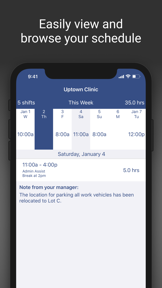
What does it look like?
Key features
Automated shift assignment engine that considers employee preferences, time-off requests, and overtime limits
In-app marketplace for employees to swap shifts with manager approval workflows
Dashboard interface allowing users to toggle between multiple organization accounts within a single login
How much does it cost?
Subscription model anchored in flexible, low-cost pricing designed for seasonal and small-to-mid-sized business budgets.
Velocity
Maintenance developmentperformanceopaqueShow more...
The app ships approximately 0.1 releases per week, placing it firmly in the maintenance tier. Development is limited to minor bug fixes and performance improvements, with no evidence of new features or live operations. The release history shows a significant gap between the latest release in May 2026 and the previous update in February 2026. The publisher provides only opaque, generic release notes, indicating a focus on stability rather than active feature development.
Who built it?
User Sentiment
What do users think recently?
Recent user voice shows an upset sentiment. Users appreciate excellent customer service responsiveness when resolving technical issues via email communication channels, but report dashboard navigation failures and blank screens prevent users from viewing their work schedules.
How are ratings & reviews evolving?
What users say, by theme
- Excellent customer service responsiveness when resolving technical issues via email communication channels
- Dashboard navigation failures and blank screens prevent users from viewing their work schedules
69 of 123 recent reviews analyzed · high confidence · Upset overall
Read the full review analysisUnlock 1 more frustration theme and 1 user request, each backed by review evidence.
Access the full report for freeCompetition
Competitive landscape for WhenToWork Employee Scheduling
How's the Business market?
WhenToWork maintains a presence in the Business category, but the 2.82 average rating across platforms signals significant friction compared to modern, automated scheduling tools.
Read the market outlookThe rivals identified

By Tanda
Workforce.com directly challenges WhenToWork by offering a modern, automated approach to employee scheduling and rostering that targets the same shift-based workforce management market.
- Automated award interpretation ensures complex labor law compliance that WhenToWork currently lacks in its platform
- Demand-based rostering uses historical data to optimize staffing levels, moving beyond simple manual schedule creation
- Superior mobile-first design drives higher engagement and adoption rates compared to WhenToWork's legacy interface


Unlock the head-to-head verdict: where this rival wins, and where it loses.
Access the full report for freeThe Analyst's Read
Key takeaways for WhenToWork Employee Scheduling
Where is it heading?
The scheduling market is consolidating around automated, compliance-aware platforms, leaving WhenToWork exposed due to its manual-first design. Unless the latest technical regressions are resolved, the app will continue to lose its mobile-active user base to web-based alternatives.
- Dashboard navigation failures in the latest release force users to the web interface, which accelerates churn and erodes mobile-first engagement.
- Frequent startup crashes on Android create a negative feedback loop, further widening the rating gap between platforms and damaging brand trust.
The SWOT
- Subscription pausing retains seasonal business data
- Multi-account switching reduces power-user friction
- Education partnerships for B2B distribution
- Automated compliance tools to match Workforce.com
Next best moves
Rebuild dashboard loading logic because navigation failures are the #1 complaint → restore daily active usage
+ 1 more prioritized moveThe counter-intuitive read
The app's legacy interface is not just a weakness but a moat…
Read the full takeFeature gaps
AI-driven demand forecasting (available in Workforce.com) +2
Since the last report: Technical regressions in the latest update have caused a sharp decline in user sentiment and platform stability, shifting the outlook from mixed to declining.
Bottom line
The app is failing its primary utility due to dashboard crashes, because technical regressions are driving users to the web interface, so the PM must prioritize stability over new feature development to stop churn.
Unlock 3 critical frictions, 2 market threats, 1 more prioritized move and the analyst’s take.
Access the full report for freeReport last updated