


XLSX Editor: Edit Spreadsheet
By Ifrah Abid

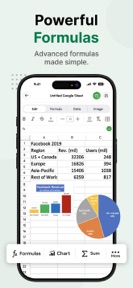


XLSX Editor is a spreadsheet management tool for iPhone and iPad that allows users to open, edit, and export XLSX, XLS, and CSV files.
The App DNA
What makes this app unique?
The app removes the friction of managing complex spreadsheet data on mobile devices by providing an integrated AI assistant for formula help and calculations.
For Business owners, freelancers, and mobile professionals who require spreadsheet management and data reporting on iPhone and iPad.
What does it look like?
Key features
Integrated chatbot for formula generation and data queries, serving as a premium-tier gate to drive subscription conversion.
Native editing for XLSX, XLS, and CSV files, ensuring compatibility with existing workflows to reduce churn.
Direct access via iOS Files and iCloud Drive, reducing file management friction to support daily usage.
How much does it cost?
The freemium model gates core editing utility behind a subscription to monetize power users who require full spreadsheet functionality.
Velocity
Maintenance developmentUX improvementsperformanceShow more...
The app is currently in a maintenance phase, having shipped only one release in the last 79 days. Development is limited to minor bug fixes and general UI improvements, with no evidence of new features or live operations. This cadence suggests a focus on stability rather than active feature expansion. The latest release occurred 79 days ago, reflecting a stable but slow development cycle.
Who built it?
User Sentiment
What do users think recently?
How are ratings & reviews evolving?
Not enough recent reviews to extract reliable themes yet.
Read the full review analysisCompetition
Competitive landscape for XLSX Editor: Edit Spreadsheet
How's the Business market?
XLSX Editor occupies the Business category, providing a mobile-first spreadsheet solution for users who need to edit files on the go. The app's reliance on a subscription gate for core editing utility positions it as a tool for professional users rather than casual data viewers.
Read the market outlookThe rivals identified
Unlock the deeper market read.
Access the full report for freeThe Analyst's Read
Key takeaways for XLSX Editor: Edit Spreadsheet
Where is it heading?
The mobile spreadsheet market is consolidating around tools that offer seamless file compatibility and AI-assisted productivity. XLSX Editor remains stable but exposed, as the lack of a frequent update cadence makes it vulnerable to rivals that can iterate faster on user-requested features.
- The maintenance-only release cadence indicates a focus on stability rather than aggressive feature expansion, which limits the potential for rapid market share growth.
- The integration of AI formula assistance provides a clear utility for professional users, which serves as a defensible barrier against basic spreadsheet viewers.
The SWOT
- Native XLSX, XLS, and CSV support
- Integrated AI assistant for formula help
- Files app and iCloud integration
- Template library expansion for freelance invoicing
- PDF export utility for report sharing
Next best moves
Audit formula performance because the AI assistant is the primary differentiator → increase subscription conversion
+ 1 more prioritized moveThe counter-intuitive read
The reliance on a subscription gate for basic editing is a risk…
Read the full takeBottom line
XLSX Editor provides essential spreadsheet utility, but the maintenance-only update cadence risks stagnation against more active competitors. Focusing on stability and core formula performance will retain the professional user base, while the current subscription gate requires consistent feature delivery to justify the cost.
Unlock 2 critical frictions, 1 market threat, 1 more prioritized move and the analyst’s take.
Access the full report for freeFAQ
Is XLSX Editor free to use?
Does XLSX Editor support CSV files?
Can I use XLSX Editor offline?
Sources
- [1] App Store
Report last updated