





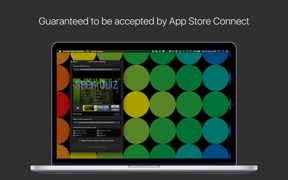
App Preview Video Converter is a utility for iOS and Mac developers that re-encodes and resizes videos to meet Apple App Store submission requirements.
The App DNA
What makes this app unique?
The app removes the cognitive cost of researching Apple's technical documentation, allowing developers to bypass manual formatting and avoid submission rejections.
For iOS and Mac developers who need to format and validate app preview videos for App Store Connect.
What does it look like?
Key features
Automated conversion of video and audio tracks into Apple-compliant formats for App Store Connect
Batch processing to generate specific video dimensions for all Apple device sizes
Pre-submission check for video length and format compatibility to prevent rejection
How much does it cost?
Paid model anchored at $4.99, targeting developers with a one-time utility purchase.
Velocity
Dormant developmentperformanceShow more...
Development momentum is effectively non-existent, with the last release occurring 205 days ago. The iOS platform has been stagnant for 2,079 days, indicating the developer has largely abandoned the project. The most recent update was a minor bug fix, and there have been no significant feature additions or live operations to suggest ongoing support.
Who built it?
BRIDGETECH SOLUTIONS
13+ apps tracked · Developer Tools
 Blood Pressure Monitor Connect
 Klued Up: Board Game Solver
 Off - Shutdown and Wake On Lan
 Geek Quiz
 White Noise: Sound Machine
 Lottery Balls - Random Picker
 Asset Catalog Creator
 News Widget - Offline Reader
 Musical Chairs: Party Games
 Klued Up Pro Board Game Solver
 Asset Catalog Creator Pro
 Hypnobirthing Baby
User Sentiment
What do users think recently?
The recent review mood reads thrilled. Users appreciate video conversion tools simplify the technical requirements for submitting app previews to the store and the simple interface allows developers to quickly process and trim preview videos for store uploads.
How are ratings & reviews evolving?
What users say, by theme
- Video conversion tools simplify the technical requirements for submitting app previews to the store
- The simple interface allows developers to quickly process and trim preview videos for store uploads
- High quality output ensures that upscaled video previews meet professional standards for store pages
- Lack of support for larger display resolutions forces users to seek alternative conversion tools
21 of 21 recent reviews analyzed · moderate confidence · Thrilled overall
Read the full review analysisUnlock 1 more frustration theme and 1 user request, each backed by review evidence.
Access the full report for freeCompetition
Competitive landscape for App Preview Video Converter
How's the Developer Tools market?
App Preview Video Converter holds a niche position in the Developer Tools category, currently ranking #183 in US Video Players. The lack of updates for over 200 days limits its ability to compete with general-purpose converters that maintain active support for new device resolutions.
Read the market outlookThe rivals identified

By Geshi Inc.
This app is a direct threat due to its massive install base and broad utility, capturing users who need general-purpose video conversion alongside specialized App Store preview requirements.
- Massive user base and high review volume create a significant barrier to entry for new competitors.
- Broad format support beyond just iOS requirements attracts a wider audience than niche preview tools.
- Aggressive update cadence ensures compatibility with the latest video codecs and mobile device hardware standards.


Unlock the head-to-head verdict: where this rival wins, and where it loses.
Access the full report for freeThe Analyst's Read
Key takeaways for App Preview Video Converter
Where is it heading?
The developer tools market is consolidating around converters that offer both broad format support and rapid updates for new device standards. App Preview Video Converter is currently exposed due to its maintenance-mode cadence, which will likely lead to further market share loss to more active rivals by Q2.
- The lack of updates for over 200 days prevents compatibility with new hardware, which directly drives long-term user churn.
- Persistent complaints regarding letterboxing and resolution support suggest the current feature set is falling behind modern developer workflows.
The SWOT
- Validation logic prevents App Store Connect rejections
- Simplified interface reduces friction for developers
- Implement batch processing for multiple video files
- Add stretch-to-fit options to resolve letterboxing complaints
Next best moves
Ship support for larger display resolutions because it is the top-cited churn driver → stabilize user base
+ 1 more prioritized moveThe counter-intuitive read
The app's niche focus is its primary risk…
Read the full takeFeature gaps
Batch processing (available in Format Factory but missing here) +1
Since the last report: Development activity has ceased, with the app entering a zombie state after 205 days of silence. This lack of maintenance is now actively eroding the user base through unresolved hardware compatibility and output quality issues.
Bottom line
The app's utility as a submission-risk mitigator remains its strongest asset, but the lack of display-standard updates is eroding its value. Prioritizing modern resolution support would unlock retention among long-term developers who are currently forced to churn to more active alternatives.
Unlock 2 critical frictions, 2 market threats, 1 more prioritized move and the analyst’s take.
Access the full report for freeFAQ
Is App Preview Video Converter worth paying for?
How does this compare to general video converters?
Does the app support the latest iPhone screen sizes?
What is a free alternative for video conversion?
Sources
- [1] App Store, source
Report last updated